GitHub Trending
GitHub Weekly Trending
Total Repos
10
Avg Stars
55.5K
Languages
3
Weeks of Data
1
Oct 2026 · W1Top 10
RepositoryStarsForks
1
paperclipai/paperclip
The open-source app everyone uses to manage agents at work
TypeScript97.3K8.7K
1
paperclipai/paperclip
The open-source app everyone uses to manage agents at work
TypeScript
97.3K
stars
8.7K
forks






What users love
Demand for broader model compatibility, including GPT-6 support.
Interest in GitHub-based skill import and authenticated access using a GITHUB_TOKEN.
Interest in multi-agent boardroom discussions involving both agents and human participants.
Interest in per-agent GitHub identities and scoped repository credentials for agent Git operations.
Areas for improvement
Installation and onboarding are unreliable on fresh systems: Debian installs an unsupported Node.js version, macOS embedded Postgres can fail, and OpenAI onboarding can fail.
Claude Code and other agent runtimes have execution failures, including terminal-access errors and OpenCode command failures.
Windows and WSL2 compatibility problems block credential verification, Git launching, and in-run API callbacks.
Authorization and recovery bugs prevent agents from cancelling runs, commenting, or updating issue status, leaving completed work in zombie issues.
Cost accounting can severely undercount usage because the Codex ACP engine records only the final model request in a run.
What users love
Demand for broader model compatibility, including GPT-6 support.
Interest in GitHub-based skill import and authenticated access using a GITHUB_TOKEN.
Interest in multi-agent boardroom discussions involving both agents and human participants.
Interest in per-agent GitHub identities and scoped repository credentials for agent Git operations.
Areas for improvement
Installation and onboarding are unreliable on fresh systems: Debian installs an unsupported Node.js version, macOS embedded Postgres can fail, and OpenAI onboarding can fail.
Claude Code and other agent runtimes have execution failures, including terminal-access errors and OpenCode command failures.
Windows and WSL2 compatibility problems block credential verification, Git launching, and in-run API callbacks.
Authorization and recovery bugs prevent agents from cancelling runs, commenting, or updating issue status, leaving completed work in zombie issues.
Cost accounting can severely undercount usage because the Codex ACP engine records only the final model request in a run.
2
vectorize-io/hindsight
Hindsight: Agent Memory That Learns
Python45.6K10.6K
2
vectorize-io/hindsight
Hindsight: Agent Memory That Learns
Python
45.6K
stars
10.6K
forks



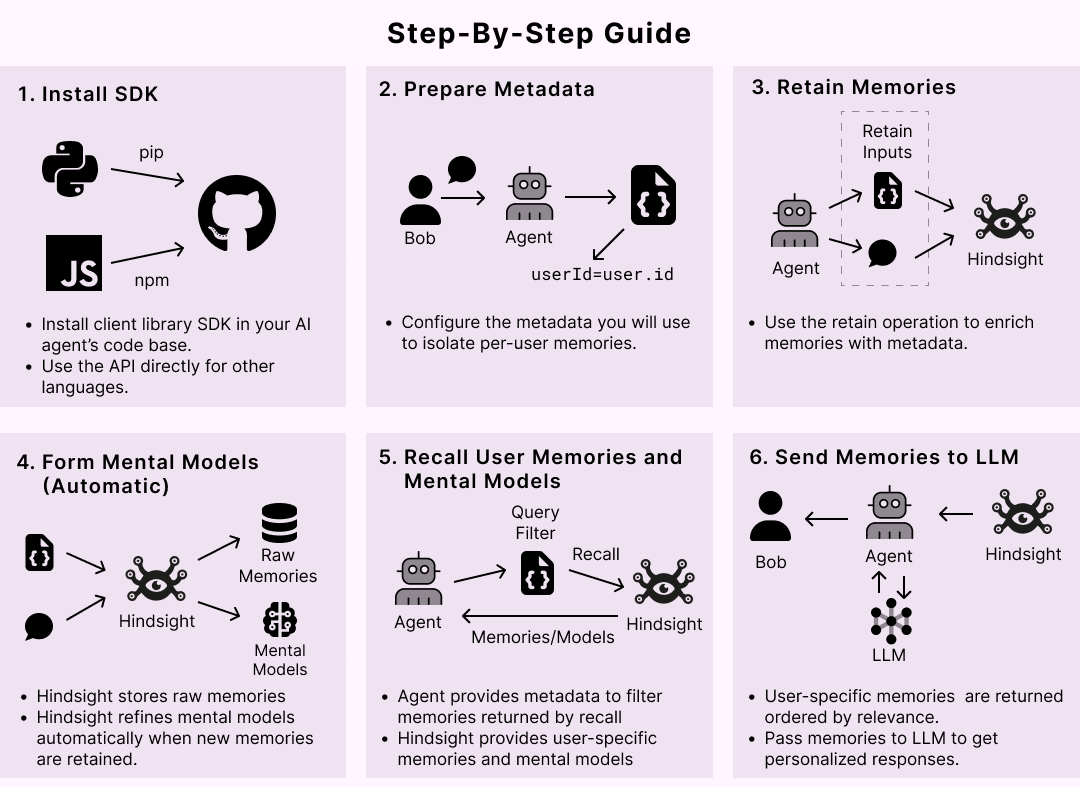
What users love
Bundled MCP server works in a reported dsh integration case where native plugin tools fail.
Existing data can remain retrievable through recall even when reflect or knowledge-page refresh incorrectly reports no information.
Auto-retain worked on an earlier OpenClaw version (2026.5.20) before later hook regressions.
Areas for improvement
Recall can fail or hang: realistic-size banks can exceed reranker context limits, and version 0.10.1 reportedly hangs even with a one-document bank.
Mental-model refresh can retry indefinitely or fail to converge without cost or rate guards, causing unbounded paid-LLM spend.
Reflect and knowledge-page refresh are unreliable: responses are not persisted or shown in UI history, timeouts can be swallowed, and calls may claim no information despite retrievable data.
Integration regressions can silently prevent automatic retention or break tools, including OpenClaw hooks, Cline VSCode hooks, and dsh source-kind/plugin compatibility.
Data and operational reliability issues include dropped tags during consolidation, incorrect synthetic timestamps during backfill, slash-containing IDs returning 404s, and failed S3 export downloads.
What users love
Bundled MCP server works in a reported dsh integration case where native plugin tools fail.
Existing data can remain retrievable through recall even when reflect or knowledge-page refresh incorrectly reports no information.
Auto-retain worked on an earlier OpenClaw version (2026.5.20) before later hook regressions.
Areas for improvement
Recall can fail or hang: realistic-size banks can exceed reranker context limits, and version 0.10.1 reportedly hangs even with a one-document bank.
Mental-model refresh can retry indefinitely or fail to converge without cost or rate guards, causing unbounded paid-LLM spend.
Reflect and knowledge-page refresh are unreliable: responses are not persisted or shown in UI history, timeouts can be swallowed, and calls may claim no information despite retrievable data.
Integration regressions can silently prevent automatic retention or break tools, including OpenClaw hooks, Cline VSCode hooks, and dsh source-kind/plugin compatibility.
Data and operational reliability issues include dropped tags during consolidation, incorrect synthetic timestamps during backfill, slash-containing IDs returning 404s, and failed S3 export downloads.
3
pbakaus/impeccable
Impeccable
Design guidance for AI coding agents. 1 skill, 24 commands, live browser iteration, and 61 deterministic detector rules for AI-generated frontend design.
Quick start: From your project root, run npx impeccable install, then run /impeccable init inside your AI coding tool. Full docs: impeccable.style.
Why Impeccable?
Anthropic's frontend-design was the first widely-used design skill for Claude. Impeccable started from there.
Every model trained on the same SaaS templates. Skip the guidance and you get the same handful of tells on every project: Inter for everything, purple-to-blue gradients, cards nested in cards, gray text on colored backgrounds, the rounded-square icon tile above every heading.
Impeccable adds:
One setup flow. /impeccable init records durable product truth in PRODUCT.md, so later commands know the audience, purpose, operating context, constraints, voice, and evidence without confusing those facts with surface-level visual direction.
24 commands. A shared design vocabulary with your AI: polish, audit, critique, distill, animate, bolder, quieter, and more.
61 deterministic detector rules plus LLM-only critique checks. The CLI and browser extension run the deterministic rules with no LLM and no API key.
What's Included
The Skill: impeccable
The skill installs as one command:
/impeccable
Start every new project with:
/impeccable init
init inspects the project, asks only for material gaps in durable product truth, and writes PRODUCT.md. Visitor mode and visual direction are chosen later for each surface; incumbent or newly built visual systems are recorded separately in DESIGN.md.
24 Commands
All commands are accessed through /impeccable:
| Command | What it does |
|---------|--------------|
| /impeccable craft | Full shape-then-build flow with visual iteration |
| /impeccable init | One-time setup: gather durable product context, write PRODUCT.md, configure live mode when applicable, recommend next steps |
| /impeccable document | Generate root DESIGN.md from existing project code |
| /impeccable extract | Pull reusable components and tokens into the design system |
| /impeccable shape | Plan UX/UI before writing code |
| /impeccable critique | UX design review: hierarchy, clarity, emotional resonance |
| /impeccable audit | Run technical quality checks (a11y, performance, responsive) |
| /impeccable polish | Final pass, design system alignment, and shipping readiness |
| /impeccable bolder | Amplify boring designs |
| /impeccable quieter | Tone down overly bold designs |
| /impeccable distill | Strip to essence |
| /impeccable harden | Error handling, i18n, text overflow, edge cases |
| /impeccable onboard | First-run flows, empty states, activation paths |
| /impeccable animate | Add purposeful motion |
| /impeccable colorize | Introduce strategic color |
| /impeccable typeset | Fix font choices, hierarchy, sizing |
| /impeccable layout | Fix layout, spacing, visual rhythm |
| /impeccable delight | Add moments of joy |
| /impeccable overdrive | Add technically extraordinary effects |
| /impeccable clarify | Improve unclear UX copy |
| /impeccable adapt | Adapt for different devices |
| /impeccable optimize | Performance improvements |
| /impeccable live | Visual variant mode: iterate on elements in the browser |
| /impeccable generate | Generate variants of a named element in the live browser, no manual picking |
Use /impeccable pin to create standalone shortcuts (e.g., pin audit creates /audit).
Usage Examples
/impeccable audit blog # Audit blog hub + post pages
/impeccable critique landing # UX design review
/impeccable polish settings # Final pass before shipping
/impeccable harden checkout # Add error handling + edge cases
Or use /impeccable directly with a description:
/impeccable redo this hero section
Anti-Patterns
The skill includes explicit guidance on what to avoid:
Don't use overused fonts (Arial, Inter, system defaults)
Don't use gray text on colored backgrounds
Don't use pure black/gray (always tint)
Don't wrap everything in cards or nest cards inside cards
Don't use bounce/elastic easing (feels dated)
See It In Action
Visit the Neo Mirai case study to see a before/after case study of a real project transformed with Impeccable commands.
Installation
The skill needs no runtime of its own. Every skill copy ships a small launcher (scripts/impeccable, plus impeccable.cmd for Windows) that runs the Impeccable engine, a self-contained binary that either sits next to the launcher or is downloaded once on first run into ~/.impeccable/bin/. Node is only involved if you use the npx impeccable installer, which is a shim around the same binary; the manual and Git options below work without it.
Option 1: CLI installer (Recommended)
From the root of your project, run:
npx impeccable install
This shows the harness folders or installed CLIs it detected (for example /.claude, /.codex, /.grok, /.hermes, /.veto, or project-local .cursor), lets you keep the detected set or customize providers, then asks whether to install into the current project or globally. Use --providers=claude,codex,cursor,grok,hermes,veto and --scope=project|global to skip those choices in scripts. On Claude Code, Cursor, Codex, GitHub Copilot, and Grok Build, it also installs the provider-native hook manifest for the current project. Veto receives the packaged skill under /.veto/skills/ and does not run native Impeccable edit hooks. Works with Cursor, Claude Code, Gemini CLI, Codex CLI, Grok Build, Hermes Agent, Veto, and every other supported tool. Reload your harness afterward.
To refresh an existing install, run:
npx impeccable update
Codex users should open /hooks after install or update and approve the project hook when prompted. Codex tracks trust by hook definition, so updates that change .codex/hooks.json can require approval again. Grok Build users need project folder trust (/hooks-trust or launch with --trust) before .grok/hooks/ scripts run.
See Allow the hook in your harness for harness-specific trust and verification steps.
Option 2: Git Submodule
For teams that want to keep Impeccable vendored and updated through Git, add this repo as a submodule and link the compiled provider build into your harness folders:
git submodule add https://github.com/pbakaus/impeccable .impeccable
npx impeccable link --source=.impeccable --providers=claude,cursor
git add .gitmodules .impeccable .claude .cursor
git commit -m "Add Impeccable skills"
Use the providers your project needs, for example claude, cursor, gemini, codex, github, grok, hermes, opencode, pi, qoder, trae, trae-cn, rovo-dev, vibe, or veto. The command links individual skill folders from .impeccable/dist/universal/ and leaves existing real skill directories untouched unless you pass --force.
To update later:
git submodule update --remote .impeccable
npx impeccable link --source=.impeccable --providers=claude,cursor
Option 3: Plugin install
GitHub Copilot in VS Code:
Install Impeccable from the Visual Studio Marketplace, or run:
code --install-extension renaissance-geek.impeccable
Requires VS Code 1.109.3+, Copilot Chat access, and a trusted local workspace. Open Chat in Agent mode and try /impeccable polish. This skill-only extension does not install automatic hooks; avoid a duplicate Impeccable skill in the same workspace/profile. See VS Code distribution details.
Claude Code:
/plugin marketplace add pbakaus/impeccable
Claude Code only. After adding the marketplace, open /plugin and install Impeccable from the list.
Grok Build:
grok plugin install pbakaus/impeccable#plugin --trust
Grok Build only. The #plugin suffix installs the slim plugin package (skills, agents, and hooks) instead of the full monorepo. Then run /impeccable init in a Grok session. Project-scoped installs via npx impeccable install --providers=grok also work and write .grok/skills/ plus .grok/hooks/impeccable.json.
Option 4: Download from Website
Visit impeccable.style, download the ZIP for your tool, and extract to your project.
Option 5: Copy from Repository
Cursor:
cp -r dist/cursor/.cursor your-project/
Note: Cursor skills require setup:
1. Switch to Nightly channel in Cursor Settings → Beta
2. Enable Agent Skills in Cursor Settings → Rules
Learn more about Cursor skills
Claude Code:
Project-specific
cp -r dist/claude-code/.claude your-project/
Or global (applies to all projects)
cp -r dist/claude-code/.claude/* ~/.claude/
OpenCode:
cp -r dist/opencode/.opencode your-project/
DeepSeek Harness:
Project-specific
cp -r dist/dsh/.dsh your-project/
Or global (applies to all projects)
mkdir -p "${DSH_HOME:-$HOME/.dsh}/skills"
cp -r dist/dsh/.dsh/skills/* "${DSH_HOME:-$HOME/.dsh}/skills/"
The CLI honors DSH_HOME only when it resolves inside your home directory (or to home itself); otherwise it uses ~/.dsh. An outside-home manual copy is not managed by impeccable install/update.
Hermes Agent:
Global (applies to all projects; uses the active profile, or ~/.hermes by default)
cp -r dist/hermes/.hermes/skills/* "${HERMES_HOME:-$HOME/.hermes}/skills/"
Or project-specific
cp -r dist/hermes/.hermes your-project/
Note: Hermes gates project-local skills behind a per-repo trust decision
(they are procedure documents, so auto-loading them from any cloned repo is
treated as a prompt-injection vector). After a project-scoped install, run
hermes skills trust once from the project root. Global installs into the
active $HERMES_HOME/skills/ (or ~/.hermes/skills/ when unset) load without
a trust step. /impeccable then
routes through the skill's Commands table; the design hook does not install
on Hermes (no hook surface).
Learn more about Hermes skills
Pi:
cp -r dist/pi/.pi your-project/
Gemini CLI:
cp -r dist/gemini/.gemini your-project/
Note: Gemini CLI skills require setup:
1. Install preview version: npm i -g @google/gemini-cli@preview
2. Run /settings and enable "Skills"
3. Run /skills list to verify installation
Learn more about Gemini CLI skills
Codex CLI:
Project-local
cp -r dist/agents/.agents your-project/
mkdir -p your-project/.codex
cp dist/codex/.codex/hooks.json your-project/.codex/hooks.json
Or install the skill user-wide. Copy .codex/hooks.json into each project
where you want the design hook to run.
mkdir -p ~/.agents/skills
cp -r dist/agents/.agents/skills/* ~/.agents/skills/
The asset-producer subagent ships nested inside the skill's own agents/ folder, which Codex auto-discovers. No separate .codex/agents/ copy is needed. The hook is project-local because Codex discovers hooks from .codex/hooks.json next to trusted project config.
GitHub Copilot:
cp -r dist/github/.github your-project/
Trae:
Trae China (domestic version)
cp -r dist/trae/.trae-cn/skills/* ~/.trae-cn/skills/
Trae International
cp -r dist/trae/.trae/skills/* ~/.trae/skills/
Note: Trae has two versions with different config directories:
- Trae China: ~/.trae-cn/skills/
- Trae International: ~/.trae/skills/
After copying, restart Trae IDE to activate the skills.
Rovo Dev:
Project-specific
cp -r dist/rovo-dev/.rovodev your-project/
Or global (applies to all projects)
cp -r dist/rovo-dev/.rovodev/skills/* ~/.rovodev/skills/
Qoder:
Project-specific
cp -r dist/qoder/.qoder your-project/
Or global (applies to all projects)
cp -r dist/qoder/.qoder/skills/* ~/.qoder/skills/
Mistral Vibe:
Project-specific
cp -r dist/vibe/.vibe your-project/
Or global (applies to all projects)
cp -r dist/vibe/.vibe/skills/* ~/.vibe/skills/
Grok Build:
Project-specific
cp -r dist/grok/.grok your-project/
Or global (applies to all projects)
cp -r dist/grok/.grok/skills/* ~/.grok/skills/
Prefer npx impeccable install --providers=grok or grok plugin install pbakaus/impeccable#plugin --trust so the design hook installs too. Project hooks need /hooks-trust (or --trust) once per folder.
Google Antigravity:
Project-specific
cp -r dist/antigravity/.agent your-project/
Or global (applies to all projects)
mkdir -p ~/.gemini/config/skills
cp -r dist/antigravity/.agent/skills/* ~/.gemini/config/skills/
Usage
Once installed, every command runs through the single /impeccable skill:
/impeccable audit # Find issues
/impeccable polish # Final cleanup
/impeccable distill # Remove complexity
/impeccable critique # Full design review
Type /impeccable alone to see the full command list.
Most commands accept an optional argument to focus on a specific area:
/impeccable audit the header
/impeccable polish the checkout form
If you reach for one command often, pin it with /impeccable pin audit to get /audit as a standalone shortcut.
Note: Codex uses skills here, not /prompts: commands. Open /skills or type $impeccable. Repo-local installs live in .agents/skills/; user-wide installs live in ~/.agents/skills/. GitHub Copilot uses .github/skills/. Restart the tool if a newly installed skill does not appear.
Keeping .impeccable out of git
As you run commands, Impeccable writes working files under .impeccable/: critique and polish screenshots, live-mode session and preview state, runtime caches, and per-developer config. Most of it is ephemeral and should not be committed, while a few files are shared project artifacts that belong in the repo. Add this block to your project's .gitignore:
impeccable-ignore-start
Ephemeral output, runtime state, and per-dev overrides.
The **/ prefix covers .impeccable at the repo root or in a nested workspace.
Shared artifacts stay tracked: config.json, live/config.json,
design.json, surfaces/.md, critique/.md.
**/.impeccable/config.local.json
**/.impeccable/hook.cache.json
**/.impeccable/hook.pending.json
*/.impeccable/.png
**/.impeccable/review/
**/.impeccable/questions/
**/.impeccable/live/server.json
**/.impeccable/live/sessions/
**/.impeccable/live/previews/
**/.impeccable/live/annotations/
**/.impeccable/live/cache/
**/.impeccable/live/manual-edit-apply-transaction.json
**/.impeccable/live/manual-edit-events.jsonl
**/.impeccable/live/manual-edit-evidence/
**/.impeccable/live/pending-manual-edits.json
**/.impeccable/live/deferred-svelte-component-accepts.json
*/.impeccable/live/.png
impeccable-ignore-end
The block is wrapped in # impeccable-ignore-start / # impeccable-ignore-end markers so you can recognize and refresh it later. The **/ prefix makes each pattern match whether the active project's .impeccable/ directory is at the repository root or under a nested workspace path like apps/web/.
Keep these tracked (they are shared project artifacts, do not add them to .gitignore):
.impeccable/config.json (unified shared config)
.impeccable/live/config.json (live-mode framework wiring)
.impeccable/design.json (shared design spec)
.impeccable/surfaces/*.md (route- or artifact-specific strategy and direction contracts)
.impeccable/critique/*.md (review reports)
If an ephemeral file (a screenshot, config.local.json) was committed before you added the block, .gitignore will not untrack it automatically. Run git rm --cached to stop tracking it without deleting your local copy.
Design hook
On Claude Code, GitHub Copilot, Codex, Cursor, and Grok Build, npx impeccable install and npx impeccable update install a provider-native hook manifest along with the skill payload. The hook runs the Impeccable design detector on direct UI file edits and surfaces findings back into the agent flow. Claude Code, GitHub Copilot, and Codex surface findings after the edit (and run a deeper pass on Stop where supported). Grok Build scans after the edit to warm Stop, then surfaces on Stop; PostToolUse stdout never reaches the model. Cursor blocks bad proposed writes before they land.
Installed hook surfaces:
Claude Code: .claude/settings.local.json (gitignored, machine-local) runs ${CLAUDE_PROJECT_DIR}/.claude/skills/impeccable/scripts/impeccable hook. A hook moved into the shared settings.json is honored in place.
GitHub Copilot: .github/hooks/impeccable.json (committed, shared by the Copilot CLI and the cloud agent) runs .github/skills/impeccable/scripts/impeccable hook. The Copilot CLI activates it once the file is on the repository's default branch and the folder is trusted.
Cursor: .cursor/hooks.json runs .cursor/skills/impeccable/scripts/impeccable hook-before-edit.
Codex: .codex/hooks.json runs .agents/skills/impeccable/scripts/impeccable hook, with a commandWindows sibling that calls impeccable.cmd for cmd.exe.
Grok Build: .grok/hooks/impeccable.json runs .grok/skills/impeccable/scripts/impeccable hook. Requires /hooks-trust or --trust. Findings reach the model on Stop, not after each edit.
Every command goes through the launcher shipped in the skill's scripts/ directory (impeccable, or impeccable.cmd on Windows), guarded so a missing launcher is a silent no-op. The launcher runs the engine binary that ships next to it, or downloads the pinned version once into ~/.impeccable/bin/. No Node or other runtime is required for the hook or the skill.
In Claude Code, installed command hooks run independently of model-tool approval. The first edit or Stop event can therefore download and cache the engine even if the session denies the model's launcher command. Review installed hooks before unattended runs; to disable all Claude Code hooks for a run, pass --settings '{"disableAllHooks": true}'. See Claude Code's hook security guidance.
The installer preserves unrelated hook entries and settings. If a hook manifest is malformed, install/update aborts by default; rerun with --force to back up the malformed file as .bak and replace it.
On an interactive install/update, Impeccable explains the hook and offers to install it (default yes). Your choice is remembered per-developer in the gitignored .impeccable/config.local.json, so you are not asked again; --no-hooks skips it for that run without recording anything. Hook lifecycle settings live under the hook key of .impeccable/config.json; detector ignores live under detector, shared by /impeccable hooks and npx impeccable detect.
For debugging, set hook.auditLog in .impeccable/config.json to a path (or the legacy IMPECCABLE_HOOK_LOG env var) to write one NDJSON line per hook invocation. Leave it unset for normal use.
Build path: comp-first or code-first
When a new surface gets designed, Impeccable either generates a full-fidelity comp first and builds to match it, or builds straight in code with the ambition written into a development-only direction contract in the surface brief and checked at the finish. Comp-first composes bolder and takes longer; code-first is leaner and faster. /impeccable init asks once and records the answer as buildPath in .impeccable/config.json:
{ "buildPath": "comp" }
The values are comp and code, and nothing else is read. Set it in the gitignored .impeccable/config.local.json to override the team's committed value on one machine, which is what you want when your harness has no image generation. In a monorepo, commit it once at the repo root and any workspace that wants something else sets its own. The choice appears at all only where image generation is available, since without it there is nothing to comp.
You do not have to re-run init to set it on a project that predates the setting, and you do not have to edit the file by hand either. Whatever is recorded is a default rather than a lock: every decision page carries a footer toggle, and flipping it binds that session only. Flip it on a project that has recorded nothing and Impeccable asks once, after the round, whether to keep it, then writes your answer. That is the whole migration path for an existing project: use the toggle when the default is wrong, and answer the question that follows.
Codex requires one platform step that Impeccable cannot safely skip: open /hooks after install or update and approve the project hook. There is no Codex marketplace/plugin install flow for this hook.
Full hook docs: impeccable.style/docs/hooks.
The Stop pass suppresses confirmed pre-existing findings when a verified before-edit baseline is available (currently Claude Edit/Write results for text scans). Other findings are marked new or attribution unknown; unknown is not evidence that your session caused the problem. Explicit detect scans remain unchanged.
Manual copy commands are fallback/debug instructions. The normal path is:
npx impeccable install
npx impeccable update
Live mode and production sites
Live mode edits a local checkout through a development server or local static HTML. Injecting its localhost HTTP helper into a deployed production site, including an HTTPS site, is not supported. Do not disable browser security or weaken production CSP to make it work.
Use live mode only in projects you trust to run locally. Applying copy edits automatically runs package.json's optional scripts"impeccable:manual-edit-validate"] command in a shell, with your user permissions; review that script before using live mode in an unfamiliar checkout.
For production inspection, use npx impeccable detect https://example.com or the browser extension. These inspect the rendered page; they do not provide live variant editing or write changes back to your source.
CLI
Impeccable includes a standalone CLI for detecting anti-patterns without an AI harness. npx impeccable is a small shim that runs the same engine binary the skill uses (installed as a platform-specific optional dependency, or fetched once into ~/.impeccable/bin/); Node is needed only for npx itself, and you can also download the binary directly and put it on your PATH.
npx impeccable detect src/ # scan a directory
npx impeccable detect index.html # scan an HTML file
npx impeccable detect https://example.com # scan a URL (uses an installed Chrome, Chromium, or Edge)
npx impeccable detect --json . # CI-friendly JSON output
npx impeccable detect --no-config src/ # raw scan, ignoring project config/context
npx impeccable ignores list # show detector ignores
npx impeccable ignores add-file "src/legacy/**"
npx impeccable ignores add-value overused-font Inter --reason "Brand font"
The detector catches 61 deterministic issues across AI slop (side-tab borders, purple gradients, bounce easing, dark glows) and general design quality (line length, cramped padding, small touch targets, skipped headings, and more).
Human-readable findings are diagnostics written to stderr, so redirect them with 2> findings.txt. Use --json for machine-readable results on stdout. Exit 0 means the scan completed without primary findings, exit 2 means it completed with primary findings, and exit 1 means at least one requested target could not be scanned; operational failure takes precedence for a partial multi-target scan. URL scans inspect the rendered DOM, computed layout, and accessible linked stylesheets; browser security still prevents reading cross-origin CSS without CORS. A clean detector run is evidence, not proof of visual or accessibility quality: it does not replace inspecting the rendered experience across relevant viewports.
By default, detect respects the same .impeccable/config.json and .impeccable/config.local.json detector config as the design hook: detector.ignoreRules, detector.ignoreFiles, detector.ignoreValues, and detector.designSystem.enabled. Hook lifecycle settings such as hook.enabled only affect automatic hook execution.
For a waiver that should travel with one file instead of the repo config, add an inline comment in the file: `. The marker works in any comment syntax, scopes to the whole file (or one line with impeccable-disable-line / impeccable-disable-next-line), and is bypassed by --no-inline-ignores or --no-config`.
Full detector docs: [impeccable.style/docs/detector.
Supported Tools
Cursor
Claude Code
GitHub Copilot
DeepSeek Harness
Gemini CLI
Codex CLI
Grok Build
Hermes Agent
OpenCode
Pi
Kiro
Trae
Rovo Dev
Qoder
Mistral Vibe
Veto
Google Antigravity
Community & Ecosystem
Join the community and ecosystem conversations:
GitHub Discussions: file bugs, request features, and help newcomers.
Impeccable on npm: grab the CLI, follow releases, and star the package.
Follow @pbakaus on Twitter for release notes, sample lint reports, and video highlights of new rules.
Contributing
See DEVELOP.md for contributor guidelines and build instructions.
License
Apache 2.0. See LICENSE.
Created by Paul Bakaus
JavaScript76.6K4.2K
3
pbakaus/impeccable
Impeccable
Design guidance for AI coding agents. 1 skill, 24 commands, live browser iteration, and 61 deterministic detector rules for AI-generated frontend design.
Quick start: From your project root, run npx impeccable install, then run /impeccable init inside your AI coding tool. Full docs: impeccable.style.
Why Impeccable?
Anthropic's frontend-design was the first widely-used design skill for Claude. Impeccable started from there.
Every model trained on the same SaaS templates. Skip the guidance and you get the same handful of tells on every project: Inter for everything, purple-to-blue gradients, cards nested in cards, gray text on colored backgrounds, the rounded-square icon tile above every heading.
Impeccable adds:
One setup flow. /impeccable init records durable product truth in PRODUCT.md, so later commands know the audience, purpose, operating context, constraints, voice, and evidence without confusing those facts with surface-level visual direction.
24 commands. A shared design vocabulary with your AI: polish, audit, critique, distill, animate, bolder, quieter, and more.
61 deterministic detector rules plus LLM-only critique checks. The CLI and browser extension run the deterministic rules with no LLM and no API key.
What's Included
The Skill: impeccable
The skill installs as one command:
/impeccable
Start every new project with:
/impeccable init
init inspects the project, asks only for material gaps in durable product truth, and writes PRODUCT.md. Visitor mode and visual direction are chosen later for each surface; incumbent or newly built visual systems are recorded separately in DESIGN.md.
24 Commands
All commands are accessed through /impeccable:
| Command | What it does |
|---------|--------------|
| /impeccable craft | Full shape-then-build flow with visual iteration |
| /impeccable init | One-time setup: gather durable product context, write PRODUCT.md, configure live mode when applicable, recommend next steps |
| /impeccable document | Generate root DESIGN.md from existing project code |
| /impeccable extract | Pull reusable components and tokens into the design system |
| /impeccable shape | Plan UX/UI before writing code |
| /impeccable critique | UX design review: hierarchy, clarity, emotional resonance |
| /impeccable audit | Run technical quality checks (a11y, performance, responsive) |
| /impeccable polish | Final pass, design system alignment, and shipping readiness |
| /impeccable bolder | Amplify boring designs |
| /impeccable quieter | Tone down overly bold designs |
| /impeccable distill | Strip to essence |
| /impeccable harden | Error handling, i18n, text overflow, edge cases |
| /impeccable onboard | First-run flows, empty states, activation paths |
| /impeccable animate | Add purposeful motion |
| /impeccable colorize | Introduce strategic color |
| /impeccable typeset | Fix font choices, hierarchy, sizing |
| /impeccable layout | Fix layout, spacing, visual rhythm |
| /impeccable delight | Add moments of joy |
| /impeccable overdrive | Add technically extraordinary effects |
| /impeccable clarify | Improve unclear UX copy |
| /impeccable adapt | Adapt for different devices |
| /impeccable optimize | Performance improvements |
| /impeccable live | Visual variant mode: iterate on elements in the browser |
| /impeccable generate | Generate variants of a named element in the live browser, no manual picking |
Use /impeccable pin to create standalone shortcuts (e.g., pin audit creates /audit).
Usage Examples
/impeccable audit blog # Audit blog hub + post pages
/impeccable critique landing # UX design review
/impeccable polish settings # Final pass before shipping
/impeccable harden checkout # Add error handling + edge cases
Or use /impeccable directly with a description:
/impeccable redo this hero section
Anti-Patterns
The skill includes explicit guidance on what to avoid:
Don't use overused fonts (Arial, Inter, system defaults)
Don't use gray text on colored backgrounds
Don't use pure black/gray (always tint)
Don't wrap everything in cards or nest cards inside cards
Don't use bounce/elastic easing (feels dated)
See It In Action
Visit the Neo Mirai case study to see a before/after case study of a real project transformed with Impeccable commands.
Installation
The skill needs no runtime of its own. Every skill copy ships a small launcher (scripts/impeccable, plus impeccable.cmd for Windows) that runs the Impeccable engine, a self-contained binary that either sits next to the launcher or is downloaded once on first run into ~/.impeccable/bin/. Node is only involved if you use the npx impeccable installer, which is a shim around the same binary; the manual and Git options below work without it.
Option 1: CLI installer (Recommended)
From the root of your project, run:
npx impeccable install
This shows the harness folders or installed CLIs it detected (for example /.claude, /.codex, /.grok, /.hermes, /.veto, or project-local .cursor), lets you keep the detected set or customize providers, then asks whether to install into the current project or globally. Use --providers=claude,codex,cursor,grok,hermes,veto and --scope=project|global to skip those choices in scripts. On Claude Code, Cursor, Codex, GitHub Copilot, and Grok Build, it also installs the provider-native hook manifest for the current project. Veto receives the packaged skill under /.veto/skills/ and does not run native Impeccable edit hooks. Works with Cursor, Claude Code, Gemini CLI, Codex CLI, Grok Build, Hermes Agent, Veto, and every other supported tool. Reload your harness afterward.
To refresh an existing install, run:
npx impeccable update
Codex users should open /hooks after install or update and approve the project hook when prompted. Codex tracks trust by hook definition, so updates that change .codex/hooks.json can require approval again. Grok Build users need project folder trust (/hooks-trust or launch with --trust) before .grok/hooks/ scripts run.
See Allow the hook in your harness for harness-specific trust and verification steps.
Option 2: Git Submodule
For teams that want to keep Impeccable vendored and updated through Git, add this repo as a submodule and link the compiled provider build into your harness folders:
git submodule add https://github.com/pbakaus/impeccable .impeccable
npx impeccable link --source=.impeccable --providers=claude,cursor
git add .gitmodules .impeccable .claude .cursor
git commit -m "Add Impeccable skills"
Use the providers your project needs, for example claude, cursor, gemini, codex, github, grok, hermes, opencode, pi, qoder, trae, trae-cn, rovo-dev, vibe, or veto. The command links individual skill folders from .impeccable/dist/universal/ and leaves existing real skill directories untouched unless you pass --force.
To update later:
git submodule update --remote .impeccable
npx impeccable link --source=.impeccable --providers=claude,cursor
Option 3: Plugin install
GitHub Copilot in VS Code:
Install Impeccable from the Visual Studio Marketplace, or run:
code --install-extension renaissance-geek.impeccable
Requires VS Code 1.109.3+, Copilot Chat access, and a trusted local workspace. Open Chat in Agent mode and try /impeccable polish. This skill-only extension does not install automatic hooks; avoid a duplicate Impeccable skill in the same workspace/profile. See VS Code distribution details.
Claude Code:
/plugin marketplace add pbakaus/impeccable
Claude Code only. After adding the marketplace, open /plugin and install Impeccable from the list.
Grok Build:
grok plugin install pbakaus/impeccable#plugin --trust
Grok Build only. The #plugin suffix installs the slim plugin package (skills, agents, and hooks) instead of the full monorepo. Then run /impeccable init in a Grok session. Project-scoped installs via npx impeccable install --providers=grok also work and write .grok/skills/ plus .grok/hooks/impeccable.json.
Option 4: Download from Website
Visit impeccable.style, download the ZIP for your tool, and extract to your project.
Option 5: Copy from Repository
Cursor:
cp -r dist/cursor/.cursor your-project/
Note: Cursor skills require setup:
1. Switch to Nightly channel in Cursor Settings → Beta
2. Enable Agent Skills in Cursor Settings → Rules
Learn more about Cursor skills
Claude Code:
Project-specific
cp -r dist/claude-code/.claude your-project/
Or global (applies to all projects)
cp -r dist/claude-code/.claude/* ~/.claude/
OpenCode:
cp -r dist/opencode/.opencode your-project/
DeepSeek Harness:
Project-specific
cp -r dist/dsh/.dsh your-project/
Or global (applies to all projects)
mkdir -p "${DSH_HOME:-$HOME/.dsh}/skills"
cp -r dist/dsh/.dsh/skills/* "${DSH_HOME:-$HOME/.dsh}/skills/"
The CLI honors DSH_HOME only when it resolves inside your home directory (or to home itself); otherwise it uses ~/.dsh. An outside-home manual copy is not managed by impeccable install/update.
Hermes Agent:
Global (applies to all projects; uses the active profile, or ~/.hermes by default)
cp -r dist/hermes/.hermes/skills/* "${HERMES_HOME:-$HOME/.hermes}/skills/"
Or project-specific
cp -r dist/hermes/.hermes your-project/
Note: Hermes gates project-local skills behind a per-repo trust decision
(they are procedure documents, so auto-loading them from any cloned repo is
treated as a prompt-injection vector). After a project-scoped install, run
hermes skills trust once from the project root. Global installs into the
active $HERMES_HOME/skills/ (or ~/.hermes/skills/ when unset) load without
a trust step. /impeccable then
routes through the skill's Commands table; the design hook does not install
on Hermes (no hook surface).
Learn more about Hermes skills
Pi:
cp -r dist/pi/.pi your-project/
Gemini CLI:
cp -r dist/gemini/.gemini your-project/
Note: Gemini CLI skills require setup:
1. Install preview version: npm i -g @google/gemini-cli@preview
2. Run /settings and enable "Skills"
3. Run /skills list to verify installation
Learn more about Gemini CLI skills
Codex CLI:
Project-local
cp -r dist/agents/.agents your-project/
mkdir -p your-project/.codex
cp dist/codex/.codex/hooks.json your-project/.codex/hooks.json
Or install the skill user-wide. Copy .codex/hooks.json into each project
where you want the design hook to run.
mkdir -p ~/.agents/skills
cp -r dist/agents/.agents/skills/* ~/.agents/skills/
The asset-producer subagent ships nested inside the skill's own agents/ folder, which Codex auto-discovers. No separate .codex/agents/ copy is needed. The hook is project-local because Codex discovers hooks from .codex/hooks.json next to trusted project config.
GitHub Copilot:
cp -r dist/github/.github your-project/
Trae:
Trae China (domestic version)
cp -r dist/trae/.trae-cn/skills/* ~/.trae-cn/skills/
Trae International
cp -r dist/trae/.trae/skills/* ~/.trae/skills/
Note: Trae has two versions with different config directories:
- Trae China: ~/.trae-cn/skills/
- Trae International: ~/.trae/skills/
After copying, restart Trae IDE to activate the skills.
Rovo Dev:
Project-specific
cp -r dist/rovo-dev/.rovodev your-project/
Or global (applies to all projects)
cp -r dist/rovo-dev/.rovodev/skills/* ~/.rovodev/skills/
Qoder:
Project-specific
cp -r dist/qoder/.qoder your-project/
Or global (applies to all projects)
cp -r dist/qoder/.qoder/skills/* ~/.qoder/skills/
Mistral Vibe:
Project-specific
cp -r dist/vibe/.vibe your-project/
Or global (applies to all projects)
cp -r dist/vibe/.vibe/skills/* ~/.vibe/skills/
Grok Build:
Project-specific
cp -r dist/grok/.grok your-project/
Or global (applies to all projects)
cp -r dist/grok/.grok/skills/* ~/.grok/skills/
Prefer npx impeccable install --providers=grok or grok plugin install pbakaus/impeccable#plugin --trust so the design hook installs too. Project hooks need /hooks-trust (or --trust) once per folder.
Google Antigravity:
Project-specific
cp -r dist/antigravity/.agent your-project/
Or global (applies to all projects)
mkdir -p ~/.gemini/config/skills
cp -r dist/antigravity/.agent/skills/* ~/.gemini/config/skills/
Usage
Once installed, every command runs through the single /impeccable skill:
/impeccable audit # Find issues
/impeccable polish # Final cleanup
/impeccable distill # Remove complexity
/impeccable critique # Full design review
Type /impeccable alone to see the full command list.
Most commands accept an optional argument to focus on a specific area:
/impeccable audit the header
/impeccable polish the checkout form
If you reach for one command often, pin it with /impeccable pin audit to get /audit as a standalone shortcut.
Note: Codex uses skills here, not /prompts: commands. Open /skills or type $impeccable. Repo-local installs live in .agents/skills/; user-wide installs live in ~/.agents/skills/. GitHub Copilot uses .github/skills/. Restart the tool if a newly installed skill does not appear.
Keeping .impeccable out of git
As you run commands, Impeccable writes working files under .impeccable/: critique and polish screenshots, live-mode session and preview state, runtime caches, and per-developer config. Most of it is ephemeral and should not be committed, while a few files are shared project artifacts that belong in the repo. Add this block to your project's .gitignore:
impeccable-ignore-start
Ephemeral output, runtime state, and per-dev overrides.
The **/ prefix covers .impeccable at the repo root or in a nested workspace.
Shared artifacts stay tracked: config.json, live/config.json,
design.json, surfaces/.md, critique/.md.
**/.impeccable/config.local.json
**/.impeccable/hook.cache.json
**/.impeccable/hook.pending.json
*/.impeccable/.png
**/.impeccable/review/
**/.impeccable/questions/
**/.impeccable/live/server.json
**/.impeccable/live/sessions/
**/.impeccable/live/previews/
**/.impeccable/live/annotations/
**/.impeccable/live/cache/
**/.impeccable/live/manual-edit-apply-transaction.json
**/.impeccable/live/manual-edit-events.jsonl
**/.impeccable/live/manual-edit-evidence/
**/.impeccable/live/pending-manual-edits.json
**/.impeccable/live/deferred-svelte-component-accepts.json
*/.impeccable/live/.png
impeccable-ignore-end
The block is wrapped in # impeccable-ignore-start / # impeccable-ignore-end markers so you can recognize and refresh it later. The **/ prefix makes each pattern match whether the active project's .impeccable/ directory is at the repository root or under a nested workspace path like apps/web/.
Keep these tracked (they are shared project artifacts, do not add them to .gitignore):
.impeccable/config.json (unified shared config)
.impeccable/live/config.json (live-mode framework wiring)
.impeccable/design.json (shared design spec)
.impeccable/surfaces/*.md (route- or artifact-specific strategy and direction contracts)
.impeccable/critique/*.md (review reports)
If an ephemeral file (a screenshot, config.local.json) was committed before you added the block, .gitignore will not untrack it automatically. Run git rm --cached to stop tracking it without deleting your local copy.
Design hook
On Claude Code, GitHub Copilot, Codex, Cursor, and Grok Build, npx impeccable install and npx impeccable update install a provider-native hook manifest along with the skill payload. The hook runs the Impeccable design detector on direct UI file edits and surfaces findings back into the agent flow. Claude Code, GitHub Copilot, and Codex surface findings after the edit (and run a deeper pass on Stop where supported). Grok Build scans after the edit to warm Stop, then surfaces on Stop; PostToolUse stdout never reaches the model. Cursor blocks bad proposed writes before they land.
Installed hook surfaces:
Claude Code: .claude/settings.local.json (gitignored, machine-local) runs ${CLAUDE_PROJECT_DIR}/.claude/skills/impeccable/scripts/impeccable hook. A hook moved into the shared settings.json is honored in place.
GitHub Copilot: .github/hooks/impeccable.json (committed, shared by the Copilot CLI and the cloud agent) runs .github/skills/impeccable/scripts/impeccable hook. The Copilot CLI activates it once the file is on the repository's default branch and the folder is trusted.
Cursor: .cursor/hooks.json runs .cursor/skills/impeccable/scripts/impeccable hook-before-edit.
Codex: .codex/hooks.json runs .agents/skills/impeccable/scripts/impeccable hook, with a commandWindows sibling that calls impeccable.cmd for cmd.exe.
Grok Build: .grok/hooks/impeccable.json runs .grok/skills/impeccable/scripts/impeccable hook. Requires /hooks-trust or --trust. Findings reach the model on Stop, not after each edit.
Every command goes through the launcher shipped in the skill's scripts/ directory (impeccable, or impeccable.cmd on Windows), guarded so a missing launcher is a silent no-op. The launcher runs the engine binary that ships next to it, or downloads the pinned version once into ~/.impeccable/bin/. No Node or other runtime is required for the hook or the skill.
In Claude Code, installed command hooks run independently of model-tool approval. The first edit or Stop event can therefore download and cache the engine even if the session denies the model's launcher command. Review installed hooks before unattended runs; to disable all Claude Code hooks for a run, pass --settings '{"disableAllHooks": true}'. See Claude Code's hook security guidance.
The installer preserves unrelated hook entries and settings. If a hook manifest is malformed, install/update aborts by default; rerun with --force to back up the malformed file as .bak and replace it.
On an interactive install/update, Impeccable explains the hook and offers to install it (default yes). Your choice is remembered per-developer in the gitignored .impeccable/config.local.json, so you are not asked again; --no-hooks skips it for that run without recording anything. Hook lifecycle settings live under the hook key of .impeccable/config.json; detector ignores live under detector, shared by /impeccable hooks and npx impeccable detect.
For debugging, set hook.auditLog in .impeccable/config.json to a path (or the legacy IMPECCABLE_HOOK_LOG env var) to write one NDJSON line per hook invocation. Leave it unset for normal use.
Build path: comp-first or code-first
When a new surface gets designed, Impeccable either generates a full-fidelity comp first and builds to match it, or builds straight in code with the ambition written into a development-only direction contract in the surface brief and checked at the finish. Comp-first composes bolder and takes longer; code-first is leaner and faster. /impeccable init asks once and records the answer as buildPath in .impeccable/config.json:
{ "buildPath": "comp" }
The values are comp and code, and nothing else is read. Set it in the gitignored .impeccable/config.local.json to override the team's committed value on one machine, which is what you want when your harness has no image generation. In a monorepo, commit it once at the repo root and any workspace that wants something else sets its own. The choice appears at all only where image generation is available, since without it there is nothing to comp.
You do not have to re-run init to set it on a project that predates the setting, and you do not have to edit the file by hand either. Whatever is recorded is a default rather than a lock: every decision page carries a footer toggle, and flipping it binds that session only. Flip it on a project that has recorded nothing and Impeccable asks once, after the round, whether to keep it, then writes your answer. That is the whole migration path for an existing project: use the toggle when the default is wrong, and answer the question that follows.
Codex requires one platform step that Impeccable cannot safely skip: open /hooks after install or update and approve the project hook. There is no Codex marketplace/plugin install flow for this hook.
Full hook docs: impeccable.style/docs/hooks.
The Stop pass suppresses confirmed pre-existing findings when a verified before-edit baseline is available (currently Claude Edit/Write results for text scans). Other findings are marked new or attribution unknown; unknown is not evidence that your session caused the problem. Explicit detect scans remain unchanged.
Manual copy commands are fallback/debug instructions. The normal path is:
npx impeccable install
npx impeccable update
Live mode and production sites
Live mode edits a local checkout through a development server or local static HTML. Injecting its localhost HTTP helper into a deployed production site, including an HTTPS site, is not supported. Do not disable browser security or weaken production CSP to make it work.
Use live mode only in projects you trust to run locally. Applying copy edits automatically runs package.json's optional scripts"impeccable:manual-edit-validate"] command in a shell, with your user permissions; review that script before using live mode in an unfamiliar checkout.
For production inspection, use npx impeccable detect https://example.com or the browser extension. These inspect the rendered page; they do not provide live variant editing or write changes back to your source.
CLI
Impeccable includes a standalone CLI for detecting anti-patterns without an AI harness. npx impeccable is a small shim that runs the same engine binary the skill uses (installed as a platform-specific optional dependency, or fetched once into ~/.impeccable/bin/); Node is needed only for npx itself, and you can also download the binary directly and put it on your PATH.
npx impeccable detect src/ # scan a directory
npx impeccable detect index.html # scan an HTML file
npx impeccable detect https://example.com # scan a URL (uses an installed Chrome, Chromium, or Edge)
npx impeccable detect --json . # CI-friendly JSON output
npx impeccable detect --no-config src/ # raw scan, ignoring project config/context
npx impeccable ignores list # show detector ignores
npx impeccable ignores add-file "src/legacy/**"
npx impeccable ignores add-value overused-font Inter --reason "Brand font"
The detector catches 61 deterministic issues across AI slop (side-tab borders, purple gradients, bounce easing, dark glows) and general design quality (line length, cramped padding, small touch targets, skipped headings, and more).
Human-readable findings are diagnostics written to stderr, so redirect them with 2> findings.txt. Use --json for machine-readable results on stdout. Exit 0 means the scan completed without primary findings, exit 2 means it completed with primary findings, and exit 1 means at least one requested target could not be scanned; operational failure takes precedence for a partial multi-target scan. URL scans inspect the rendered DOM, computed layout, and accessible linked stylesheets; browser security still prevents reading cross-origin CSS without CORS. A clean detector run is evidence, not proof of visual or accessibility quality: it does not replace inspecting the rendered experience across relevant viewports.
By default, detect respects the same .impeccable/config.json and .impeccable/config.local.json detector config as the design hook: detector.ignoreRules, detector.ignoreFiles, detector.ignoreValues, and detector.designSystem.enabled. Hook lifecycle settings such as hook.enabled only affect automatic hook execution.
For a waiver that should travel with one file instead of the repo config, add an inline comment in the file: `. The marker works in any comment syntax, scopes to the whole file (or one line with impeccable-disable-line / impeccable-disable-next-line), and is bypassed by --no-inline-ignores or --no-config`.
Full detector docs: [impeccable.style/docs/detector.
Supported Tools
Cursor
Claude Code
GitHub Copilot
DeepSeek Harness
Gemini CLI
Codex CLI
Grok Build
Hermes Agent
OpenCode
Pi
Kiro
Trae
Rovo Dev
Qoder
Mistral Vibe
Veto
Google Antigravity
Community & Ecosystem
Join the community and ecosystem conversations:
GitHub Discussions: file bugs, request features, and help newcomers.
Impeccable on npm: grab the CLI, follow releases, and star the package.
Follow @pbakaus on Twitter for release notes, sample lint reports, and video highlights of new rules.
Contributing
See DEVELOP.md for contributor guidelines and build instructions.
License
Apache 2.0. See LICENSE.
Created by Paul Bakaus
JavaScript
76.6K
stars
4.2K
forks

What users love
Active user engagement generates detailed, actionable requests for integrations, detector improvements, and workflow refinements.
Users identify demand for broader platform support, including DeepSeek Harness, Veto, Devin, Garmin Connect IQ, and portable plugin distribution.
Requests show interest in practical workflow capabilities such as configurable image APIs, browser-extension issue export, and improved setup/cleanup guidance.
Areas for improvement
Installation and activation are unreliable across environments, with reported failures on macOS, Windows, non-interactive hosts, cloning, and launcher refusal.
Windows compatibility is a major pain point: PowerShell/cmd hook syntax failures, Grok and Claude hook parser errors, update prompt failures, and Defender quarantining the executable.
Detector accuracy and coverage have recurring problems, including false positives, incorrect contrast calculations, comments parsed as markup, and incomplete scans for framework/template files.
Live mode has usability and code-safety defects, including inaccessible controls in dialogs/slideovers, invalid TSX writes, stale variant loading, and a visible browser cursor.
Hook and update behavior is inconsistent, including duplicated hook groups, misleading update status, URL scan failures returning success, and help commands triggering updates.
What users love
Active user engagement generates detailed, actionable requests for integrations, detector improvements, and workflow refinements.
Users identify demand for broader platform support, including DeepSeek Harness, Veto, Devin, Garmin Connect IQ, and portable plugin distribution.
Requests show interest in practical workflow capabilities such as configurable image APIs, browser-extension issue export, and improved setup/cleanup guidance.
Areas for improvement
Installation and activation are unreliable across environments, with reported failures on macOS, Windows, non-interactive hosts, cloning, and launcher refusal.
Windows compatibility is a major pain point: PowerShell/cmd hook syntax failures, Grok and Claude hook parser errors, update prompt failures, and Defender quarantining the executable.
Detector accuracy and coverage have recurring problems, including false positives, incorrect contrast calculations, comments parsed as markup, and incomplete scans for framework/template files.
Live mode has usability and code-safety defects, including inaccessible controls in dialogs/slideovers, invalid TSX writes, stale variant loading, and a visible browser cursor.
Hook and update behavior is inconsistent, including duplicated hook groups, misleading update status, URL scan failures returning success, and help commands triggering updates.
4
debpalash/VoiceStudio
VoiceStudio is the open-source, fully-local ElevenLabs alternative — voice cloning, voice design, video dubbing, dictation, transcription & audiobook creation in 646 languages.
Python53.3K14.7K
4
debpalash/VoiceStudio
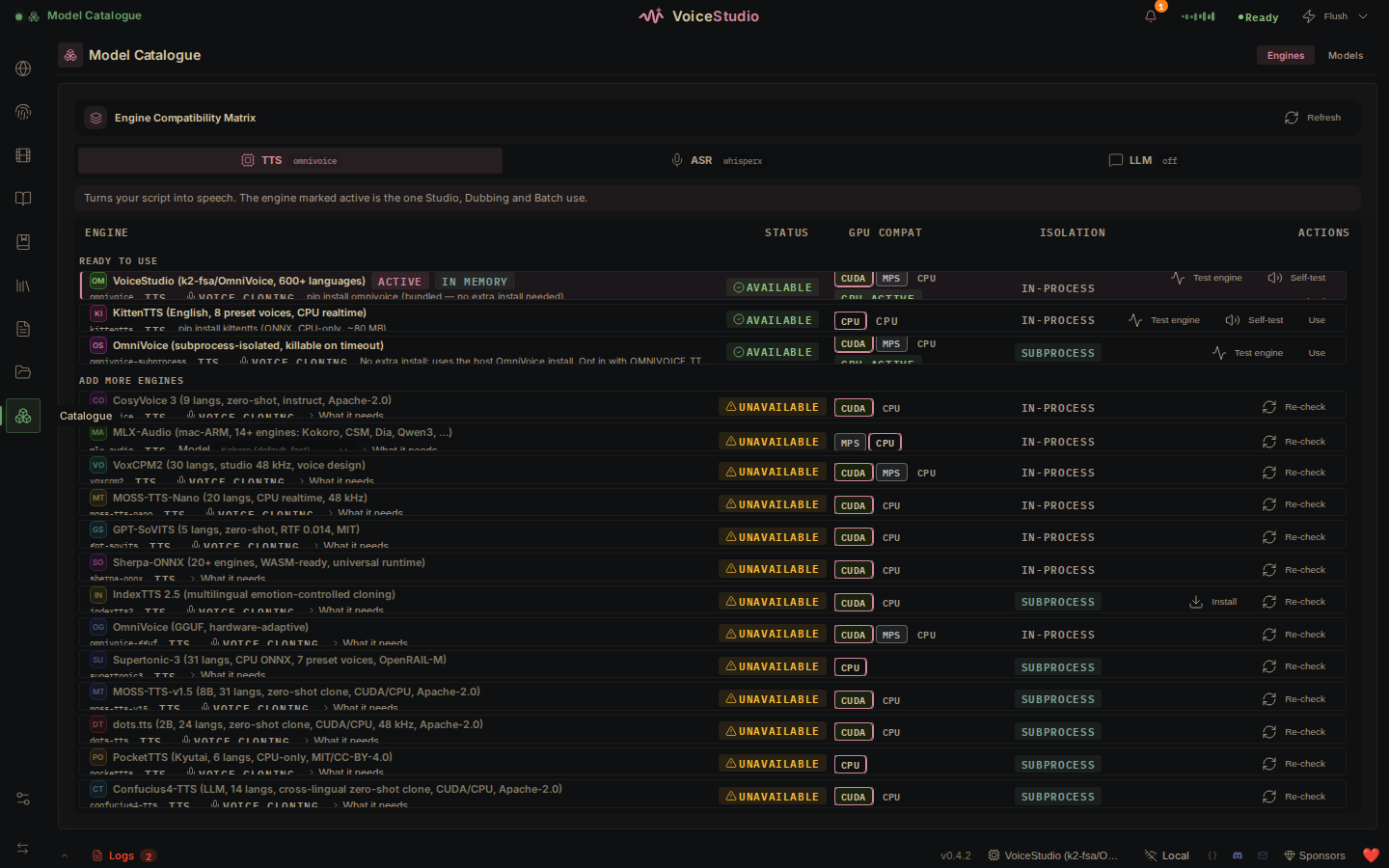
VoiceStudio is the open-source, fully-local ElevenLabs alternative — voice cloning, voice design, video dubbing, dictation, transcription & audiobook creation in 646 languages.
Python
53.3K
stars
14.7K
forks

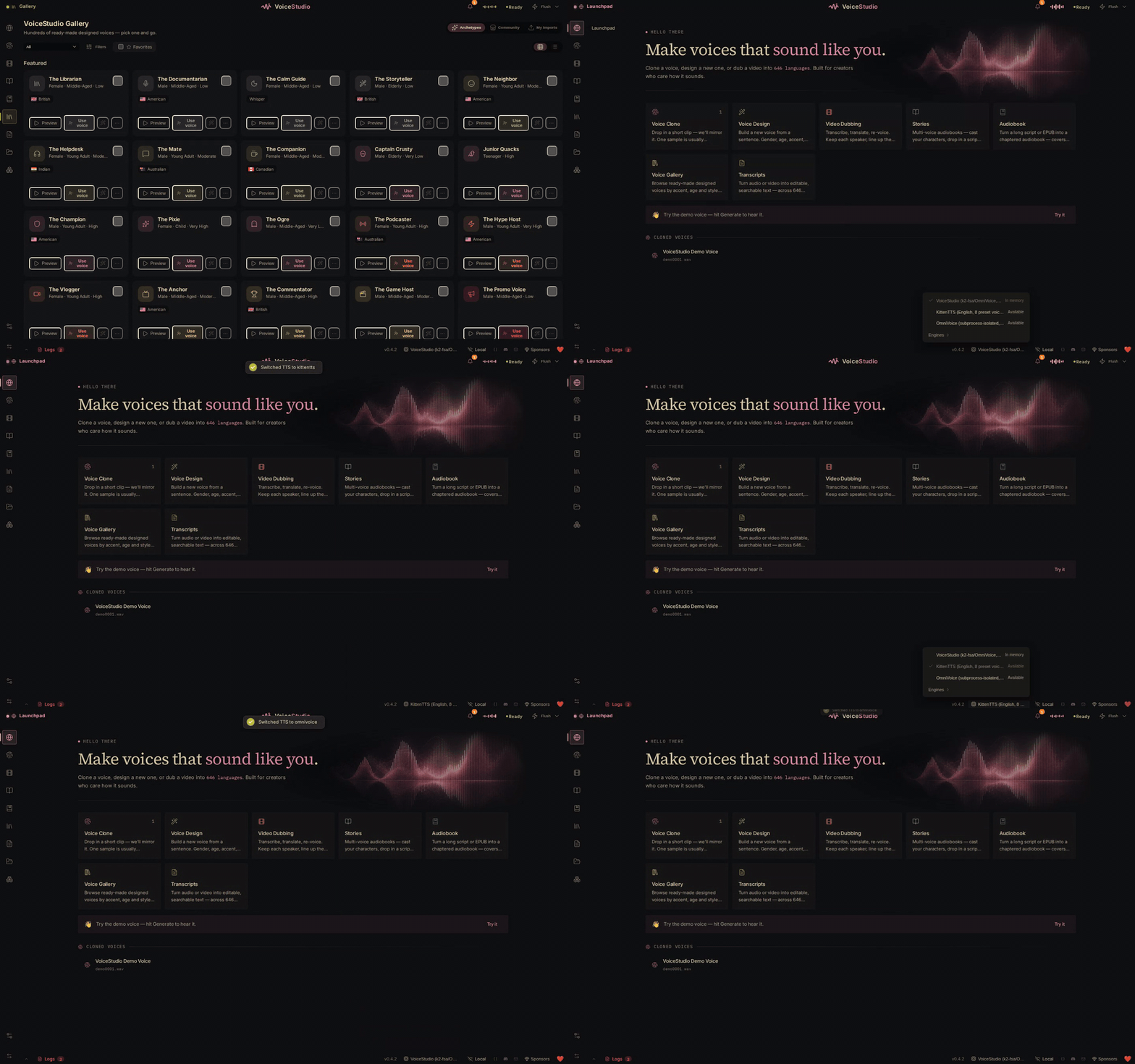
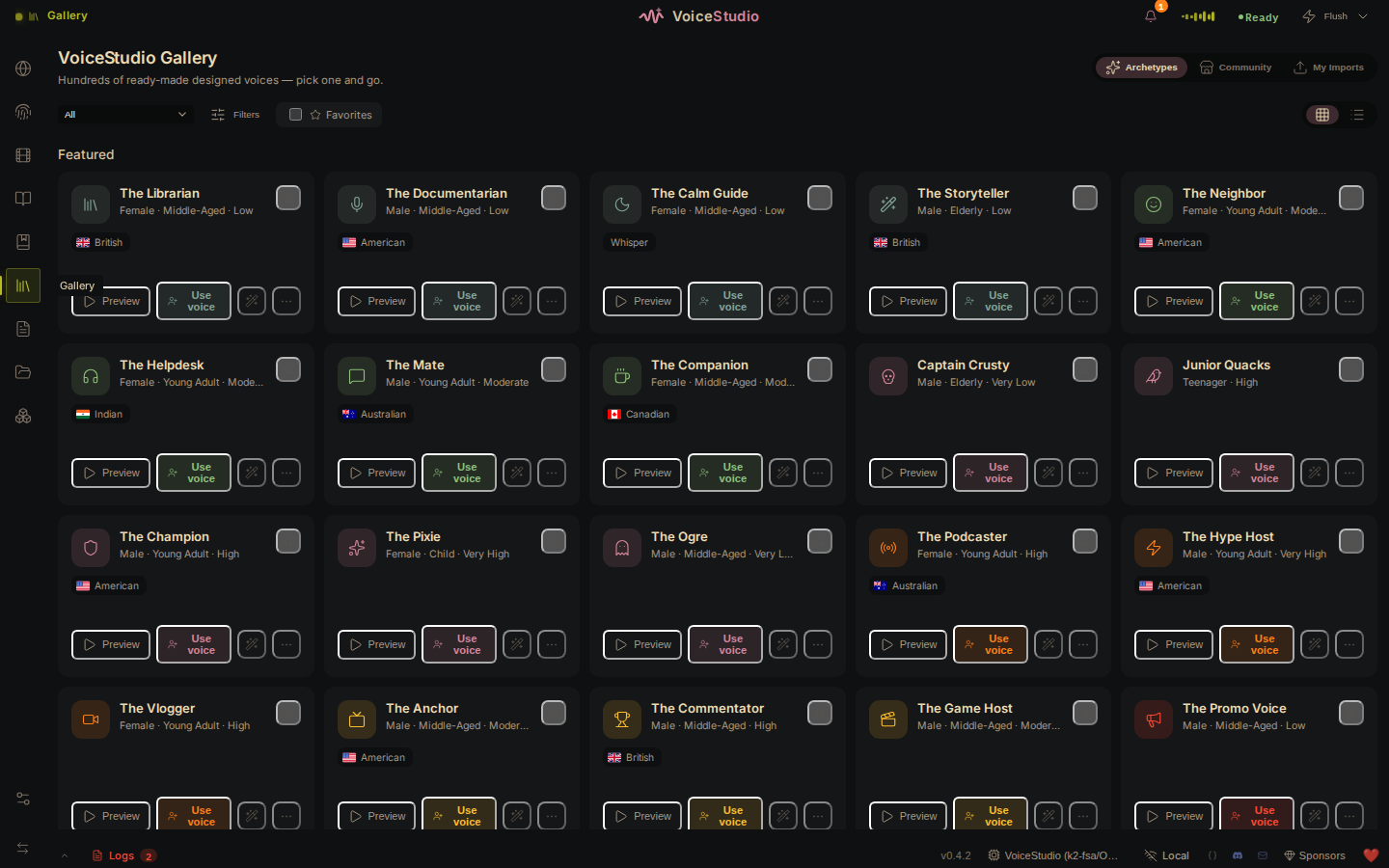

What users love
No positive feedback yet
Areas for improvement
Text-to-speech generation frequently fails with generic engine-check error messages.
Backend instability causes crashes, unexpected exits, and loss of connection to the local backend.
Generation often exceeds compute-time limits, including reports of jobs running beyond 600 seconds.
GPU-related reliability issues include out-of-memory transcription and kernel-launch/driver compatibility failures.
Error handling and setup guidance are unclear or broken, including unavailable-engine placeholders without reasons, a timeout setting with no UI, and Windows non-ASCII/code-page failures.
What users love
No positive feedback yetAreas for improvement
Text-to-speech generation frequently fails with generic engine-check error messages.
Backend instability causes crashes, unexpected exits, and loss of connection to the local backend.
Generation often exceeds compute-time limits, including reports of jobs running beyond 600 seconds.
GPU-related reliability issues include out-of-memory transcription and kernel-launch/driver compatibility failures.
Error handling and setup guidance are unclear or broken, including unavailable-engine placeholders without reasons, a timeout setting with no UI, and Windows non-ASCII/code-page failures.
5
heygen-com/hyperframes
Write HTML. Render video. Built for agents.
Studio |
Quickstart |
Showcase |
Playground |
Catalog |
Docs |
Discord
HyperFrames is an open-source framework for turning HTML, CSS, media, and seekable animations into deterministic MP4 videos. Use it locally with the CLI, from AI coding agents with skills, or as the rendering core behind hosted authoring workflows.
Quick Start
With an AI coding agent
For Claude Code, install the versioned plugin:
claude plugin marketplace add heygen-com/hyperframes
claude plugin install hyperframes@hyperframes
Enable auto-update for the hyperframes marketplace in /plugin → Marketplaces,
then use /hyperframes:hyperframes. See the plugin guide
for Copilot, VS Code, Cursor, Gemini CLI, updates, and migration.
For standalone skills (including OpenCode), use:
npx skills add heygen-com/hyperframes
The picker opens with nothing pre-selected — the Core Skills group is all you need: the /hyperframes router installs each creation workflow on demand. Agents and non-interactive runs should use npx hyperframes skills update instead — it installs exactly the core set, whereas skills add --all installs all 21 published skills. The six repo-internal skills under .claude/skills / .agents/skills are excluded by default. For the full published set use npx hyperframes skills.
skills add resolves the skills.sh registry blob, which can lag main by hours. npx hyperframes skills update installs from the current main, so reach for it when you need the newest copy of a skill.
Try a prompt like:
Using /hyperframes, create a 10-second product intro with a fade-in title, a background video, and subtle background music.
The skills teach agents the HyperFrames production loop: plan the video, write valid HTML, wire seekable animations, add media, lint, preview, and render. They work with Claude Code, Codex, Cursor, Gemini CLI, IBM Bob, and other coding agents that support skills.
Skills
HyperFrames ships 21 skills agents load on demand. Read /hyperframes first — it's the router and capability map; it picks a workflow for any "make me a…" request — video, deck, or composition port — and points to the domain skills below.
For standalone installation, default to the core set — the router installs each creation workflow on demand. npx hyperframes skills update installs exactly that from anywhere; the interactive picker (npx skills add heygen-com/hyperframes) lists it as the "Core Skills" group, nothing pre-selected. The picker is interactive-only — a non-interactive or agent run without --skill installs all 21. Use npx skills add heygen-com/hyperframes --all to install the complete published set deliberately (skips the picker), or npx skills add heygen-com/hyperframes --skill for just one (bare name, no leading /).
Standalone installs stay lean after that: npx hyperframes init keeps the core set fresh (the router, the hyperframes- domain skills, and media-use — plus whatever is already installed; /figma stays on demand) and never expands a partial install; the creation workflows install *on demand** — the router runs npx hyperframes skills update before entering one. Nothing re-pulls the full set behind your back.
Plugin packages
Plugins bundle the full skill catalog and use their agent's update manager.
bun run package:agent-plugin builds the committed portable ZIP, source metadata,
and SHA-256 checksum. See the maintainer checklist.
Upload to Codex
Build the upload-ready Codex plugin archive from the committed HEAD version of the manifest, brand assets, and skills:
bun run package:codex-plugin
This writes dist/hyperframes-plugin.zip with a hyperframes/ root folder and fails if the archive exceeds Codex's 100 MB upload limit.
Router
| Skill | Use when |
| -------------- | ------------------------------------------------------------------------------------------------------------------------------------------------------------------------------------------------------------------------------------------------------------------------ |
| /hyperframes | Read first for any request to make / create / edit / animate / render a video, animation, or motion graphic. Capability map for the domain skills, the intent layer that confirms every creation brief up front, and intent router for the creation workflows below. |
Creation workflows
| Skill | Use when |
| -------------------------- | ---------------------------------------------------------------------------------------------------------------------------------------------------------------------------------------------------------------------------- |
| /product-launch-video | Any website — marketing / launching / promoting a product (from its URL, a brief, or a script), or a site tour / showcase / social clip featuring the site's own visuals. Up to ~3 min (sweet spot 30-90s). |
| /faceless-explainer | Explaining a topic / concept from arbitrary text — no product, no URL, no website capture; every visual is LLM-invented (typography / abstract / diagram / data-viz). |
| /pr-to-video | A GitHub pull request (PR URL, owner/repo#N ref, or "this PR") → changelog / feature-reveal / fix / refactor explainer, read via the gh CLI. |
| /embedded-captions | Adding captions / subtitles to an existing talking-head video (footage untouched) — verbatim rail, embedded climax behind the subject, or pure-cinematic embed. |
| /talking-head-recut | Packaging an existing talking-head / interview / podcast video with designed graphic overlays — lower-thirds, data callouts, kinetic titles, pull-quotes, side panels, PiP. |
| /motion-graphics | A short, unnarrated, design-led motion graphic (~under 10s) — kinetic type, stat / chart hit, logo sting, lower-third, animated tweet / headline. MP4 or transparent overlay. |
| /music-to-video | A music track (audio file, video to pull audio from, or one generated from a mood brief) → a beat-synced video — lyric, slideshow, or kinetic promo; music drives pacing. |
| /slideshow | A presentation / pitch deck / interactive deck — discrete slides, fragment reveals, branching, hotspot navigation, presenter mode. Output is a navigable deck, not a rendered video. |
| /general-video | Anything else — longer or multi-scene pieces, brand / sizzle reel, title card, static loop, freeform composition. Input- and length-agnostic fallback, and the home of companion mode (co-create with the full toolbox). |
| /remotion-to-hyperframes | Porting an existing Remotion (React) composition's source to HyperFrames HTML. One-way migration, not creation. |
Domain skills (loaded on demand)
Atomic capabilities the creation workflows compose against — pull one when you need that specific layer.
| Skill | Covers |
| ------------------------ | ------------------------------------------------------------------------------------------------------------------------------------------------------------------------------------------------------------------------------------------------------------------------------------------------------------------------------------------------------------------------------------------------------------------------------------------------------------------------------------ |
| /hyperframes-core | The composition contract — data-* timing attributes, class="clip", tracks, sub-compositions, variables, framework-owned media playback, determinism rules. |
| /hyperframes-animation | All animation knowledge — atomic motion rules, scene blueprints, transitions, runtime adapters (GSAP / Lottie / Three.js / Anime.js / CSS / WAAPI / TypeGPU). |
| /hyperframes-keyframes | Seek-safe keyframe authoring across runtimes — GSAP timelines, CSS keyframes, Anime.js, WAAPI, FLIP, paths, masks, SVG morph/draw, 3D depth — plus hyperframes keyframes diagnostics for rendered motion. |
| /hyperframes-creative | Non-animation creative direction — frame.md / design.md, palettes, typography, narration, beat planning, audio-reactive visuals, composition patterns. |
| /media-use | The media OS — resolve any media need (BGM, SFX, image, icon, logo, voice, color grade, LUT) into a frozen local file or paste-ready block + ledger record, generate via TTS/music/image models when the catalog misses, transcribe, caption, remove backgrounds, and reuse assets across projects. One shared audio engine + manifest tracking. |
| /hyperframes-cli | CLI dev loop — init, lint, check, snapshot, preview, render, publish, doctor, plus HeyGen-hosted cloud rendering (cloud render) and AWS Lambda rendering (lambda deploy / render / progress). |
| /hyperframes-audio | Mix the audio already placed in a composition — voiceover carve (dip a music bed only in the bands the voice occupies, static or dynamic, level match included), the effect chain (EQ, compressor, limiter, gate, saturation, delay, reverb, chorus, phaser, bitcrush), automation envelopes on volume or any effect parameter, and submix buses (`) carrying one chain, fader and automation clock for several tracks at once. Sourcing the audio is /media-use`. |
| /hyperframes-registry | Search, install and wire registry blocks and components into compositions via hyperframes catalog / hyperframes add. Load before hand-building any named look, effect, treatment or transition. Authoring a new block or component to contribute upstream. |
| /figma | Import Figma assets, tokens, components, and storyboard sections → reconstructed motion (frames read as states, not slides) (REST/CLI) plus Motion animations (MCP) and shaders (MCP source / native export) into a composition. |
For visual design handoff workflows, see the Claude Design guide and Open Design guide.
Manually with the CLI
npx hyperframes init my-video
cd my-video
npx hyperframes preview # preview in browser with live reload
npx hyperframes render # render to MP4
Requirements: Node.js 22+, FFmpeg
What You Can Build
Need ideas? Browse the Showcase for finished videos you can watch, read, run, and remix.
Product launch videos and feature announcements
PR walkthroughs with animated code diffs, narration, and captions
Data visualizations, chart races, and map animations
Social videos with kinetic captions, overlays, and music
Docs-to-video, PDF-to-video, and site-tour explainers
Reusable motion graphics for automated content pipelines
Frame.md
frame.md — your design system, ready for video.
Every brand has a design.md. None of them were written for a camera. frame.md is the missing translation layer: it takes your web-context design spec and inverts it for the frame — the same tokens, the same rules, but rewritten so an AI agent can compose a promo video without guessing at scale or reaching for web chrome.
The output is a DESIGN.md superset your whole toolchain can read. Atoms stay sacred. Composition stays free. Numbers come from the script.
Biennale Yellow
BlockFrame
Blue Professional
Bold Poster
Broadside
Capsule
Cartesian
Cobalt Grid
Coral
Creative Mode
Browse and remix them all at hyperframes.dev/design.
How It Works
Define a video as HTML. Add data attributes for timing and tracks. Use GSAP, CSS, Lottie, Three.js, Anime.js, WAAPI, or your own frame adapter for seekable animation.
Launch day
const tl = gsap.timeline({ paused: true });
tl.from("#title", { opacity: 0, y: 40, duration: 0.8 }, 1);
window.__timelines = window.__timelines || {};
window.__timelines.launch = tl;
Preview instantly in the browser. Render locally or in Docker. The renderer seeks each frame in headless Chrome and encodes the result with FFmpeg, so the same input produces the same video.
HyperFrames Stack
HyperFrames is the open-source rendering engine, plus a growing set of tools around HTML-native video creation.
| Piece | Status | What it does |
| ----------------------------------------------- | ------------------- | ------------------------------------------------------------------------------------------------- |
| CLI | Available | Scaffold, preview, lint, inspect, and render local video projects |
| Core / Engine / Producer | Available | Parse compositions, drive headless Chrome, encode video, and mix audio |
| Catalog | Available | Reusable blocks and components for transitions, overlays, captions, charts, maps, and effects |
| Agent skills | Available | Teach coding agents the video-production patterns that generic web docs miss |
| Studio | Available, evolving | Browser surface for previewing and editing compositions |
| AWS Lambda rendering | Available | Deploy a distributed render stack and drive renders from your laptop or CI |
| hyperframes.dev | Available | Community playground for previewing, iterating, sharing, and rendering HTML-native video projects |
| frame.md | Available | Invert your design system for the camera — a DESIGN.md superset an agent can compose video from |
Catalog
Install ready-to-use blocks and components:
npx hyperframes add flash-through-white # shader transition
npx hyperframes add instagram-follow # social overlay
npx hyperframes add data-chart # animated chart
Browse the catalog at hyperframes.heygen.com/catalog.
Why HyperFrames?
HTML-native: compositions are HTML files with data attributes. No React requirement, no proprietary timeline format.
Agent-friendly: agents already write HTML, and the CLI is non-interactive by default.
Deterministic: same input, same frames, same output. Built for CI, regression tests, and automated rendering.
No build step: an index.html composition plays as-is and can be previewed directly in the browser.
Adapter-based animation: bring GSAP, CSS animations, Lottie, Three.js, Anime.js, WAAPI, or a custom runtime.
Open source: Apache 2.0 license, with no per-render fees or commercial-use thresholds.
HyperFrames vs Remotion
HyperFrames is inspired by Remotion. Both tools render video with headless Chrome and FFmpeg. The main difference is the authoring model: Remotion's bet is React components; HyperFrames' bet is plain HTML that humans and agents can both write easily.
| | HyperFrames | Remotion |
| ------------------------ | ------------------------------------- | --------------------------------------- |
| Authoring | HTML + CSS + seekable animation | React components |
| Build step | None; index.html plays as-is | Bundler required |
| Agent handoff | Plain HTML files | JSX / React project |
| Library-clock animations | Seekable, frame-accurate via adapters | Wall-clock animation patterns need care |
| Distributed rendering | Local and AWS Lambda render paths | Remotion Lambda, mature cloud renderer |
| License | Apache 2.0 | Source-available Remotion License |
Read the full comparison in the HyperFrames vs Remotion guide.
Documentation
Full documentation: hyperframes.heygen.com/introduction
Quickstart
Showcase
Guides
API Reference
Catalog
Examples
AWS Lambda rendering
Packages
| Package | Description |
| ---------------------------------------------------------------- | ----------------------------------------------------------------- |
| hyperframes | CLI for creating, previewing, linting, and rendering compositions |
| @hyperframes/core | Types, parsers, generators, linter, runtime, and frame adapters |
| @hyperframes/engine | Seekable page-to-video capture engine using Puppeteer and FFmpeg |
| @hyperframes/producer | Full rendering pipeline for capture, encode, and audio mix |
| @hyperframes/studio | Browser-based composition editor UI |
| @hyperframes/player | Embeddable `` web component |
| @hyperframes/shader-transitions | WebGL shader transitions for compositions |
| @hyperframes/aws-lambda | AWS Lambda SDK and deployment surface for distributed renders |
Community
HyperFrames is used in production at HeyGen, with community examples from teams like tldraw, TanStack, and others in ADOPTERS.md. Open a PR if your team is using HyperFrames.
Questions and ideas: Discord
Bugs and feature requests: GitHub Issues
User research: Book a casual 30-minute conversation with the HyperFrames team — no preparation or sales pitch
Security reports: SECURITY.md
Contributions: CONTRIBUTING.md
Development Note
The repo uses Git LFS for golden regression-test baselines under packages/producer/tests/**/output.mp4 (about 240 MB of .mp4 files). If you're cloning the full repo for development, install Git LFS first:
macOS
brew install git-lfs
Ubuntu / Debian
sudo apt install git-lfs
Windows
winget install GitHub.GitLFS
Then, once per machine
git lfs install
If you only need source files, you can skip LFS content:
GIT_LFS_SKIP_SMUDGE=1 git clone https://github.com/heygen-com/hyperframes.git
License
Apache 2.0
TypeScript56.9K3.1K
5
heygen-com/hyperframes
Write HTML. Render video. Built for agents.
Studio |
Quickstart |
Showcase |
Playground |
Catalog |
Docs |
Discord
HyperFrames is an open-source framework for turning HTML, CSS, media, and seekable animations into deterministic MP4 videos. Use it locally with the CLI, from AI coding agents with skills, or as the rendering core behind hosted authoring workflows.
Quick Start
With an AI coding agent
For Claude Code, install the versioned plugin:
claude plugin marketplace add heygen-com/hyperframes
claude plugin install hyperframes@hyperframes
Enable auto-update for the hyperframes marketplace in /plugin → Marketplaces,
then use /hyperframes:hyperframes. See the plugin guide
for Copilot, VS Code, Cursor, Gemini CLI, updates, and migration.
For standalone skills (including OpenCode), use:
npx skills add heygen-com/hyperframes
The picker opens with nothing pre-selected — the Core Skills group is all you need: the /hyperframes router installs each creation workflow on demand. Agents and non-interactive runs should use npx hyperframes skills update instead — it installs exactly the core set, whereas skills add --all installs all 21 published skills. The six repo-internal skills under .claude/skills / .agents/skills are excluded by default. For the full published set use npx hyperframes skills.
skills add resolves the skills.sh registry blob, which can lag main by hours. npx hyperframes skills update installs from the current main, so reach for it when you need the newest copy of a skill.
Try a prompt like:
Using /hyperframes, create a 10-second product intro with a fade-in title, a background video, and subtle background music.
The skills teach agents the HyperFrames production loop: plan the video, write valid HTML, wire seekable animations, add media, lint, preview, and render. They work with Claude Code, Codex, Cursor, Gemini CLI, IBM Bob, and other coding agents that support skills.
Skills
HyperFrames ships 21 skills agents load on demand. Read /hyperframes first — it's the router and capability map; it picks a workflow for any "make me a…" request — video, deck, or composition port — and points to the domain skills below.
For standalone installation, default to the core set — the router installs each creation workflow on demand. npx hyperframes skills update installs exactly that from anywhere; the interactive picker (npx skills add heygen-com/hyperframes) lists it as the "Core Skills" group, nothing pre-selected. The picker is interactive-only — a non-interactive or agent run without --skill installs all 21. Use npx skills add heygen-com/hyperframes --all to install the complete published set deliberately (skips the picker), or npx skills add heygen-com/hyperframes --skill for just one (bare name, no leading /).
Standalone installs stay lean after that: npx hyperframes init keeps the core set fresh (the router, the hyperframes- domain skills, and media-use — plus whatever is already installed; /figma stays on demand) and never expands a partial install; the creation workflows install *on demand** — the router runs npx hyperframes skills update before entering one. Nothing re-pulls the full set behind your back.
Plugin packages
Plugins bundle the full skill catalog and use their agent's update manager.
bun run package:agent-plugin builds the committed portable ZIP, source metadata,
and SHA-256 checksum. See the maintainer checklist.
Upload to Codex
Build the upload-ready Codex plugin archive from the committed HEAD version of the manifest, brand assets, and skills:
bun run package:codex-plugin
This writes dist/hyperframes-plugin.zip with a hyperframes/ root folder and fails if the archive exceeds Codex's 100 MB upload limit.
Router
| Skill | Use when |
| -------------- | ------------------------------------------------------------------------------------------------------------------------------------------------------------------------------------------------------------------------------------------------------------------------ |
| /hyperframes | Read first for any request to make / create / edit / animate / render a video, animation, or motion graphic. Capability map for the domain skills, the intent layer that confirms every creation brief up front, and intent router for the creation workflows below. |
Creation workflows
| Skill | Use when |
| -------------------------- | ---------------------------------------------------------------------------------------------------------------------------------------------------------------------------------------------------------------------------- |
| /product-launch-video | Any website — marketing / launching / promoting a product (from its URL, a brief, or a script), or a site tour / showcase / social clip featuring the site's own visuals. Up to ~3 min (sweet spot 30-90s). |
| /faceless-explainer | Explaining a topic / concept from arbitrary text — no product, no URL, no website capture; every visual is LLM-invented (typography / abstract / diagram / data-viz). |
| /pr-to-video | A GitHub pull request (PR URL, owner/repo#N ref, or "this PR") → changelog / feature-reveal / fix / refactor explainer, read via the gh CLI. |
| /embedded-captions | Adding captions / subtitles to an existing talking-head video (footage untouched) — verbatim rail, embedded climax behind the subject, or pure-cinematic embed. |
| /talking-head-recut | Packaging an existing talking-head / interview / podcast video with designed graphic overlays — lower-thirds, data callouts, kinetic titles, pull-quotes, side panels, PiP. |
| /motion-graphics | A short, unnarrated, design-led motion graphic (~under 10s) — kinetic type, stat / chart hit, logo sting, lower-third, animated tweet / headline. MP4 or transparent overlay. |
| /music-to-video | A music track (audio file, video to pull audio from, or one generated from a mood brief) → a beat-synced video — lyric, slideshow, or kinetic promo; music drives pacing. |
| /slideshow | A presentation / pitch deck / interactive deck — discrete slides, fragment reveals, branching, hotspot navigation, presenter mode. Output is a navigable deck, not a rendered video. |
| /general-video | Anything else — longer or multi-scene pieces, brand / sizzle reel, title card, static loop, freeform composition. Input- and length-agnostic fallback, and the home of companion mode (co-create with the full toolbox). |
| /remotion-to-hyperframes | Porting an existing Remotion (React) composition's source to HyperFrames HTML. One-way migration, not creation. |
Domain skills (loaded on demand)
Atomic capabilities the creation workflows compose against — pull one when you need that specific layer.
| Skill | Covers |
| ------------------------ | ------------------------------------------------------------------------------------------------------------------------------------------------------------------------------------------------------------------------------------------------------------------------------------------------------------------------------------------------------------------------------------------------------------------------------------------------------------------------------------ |
| /hyperframes-core | The composition contract — data-* timing attributes, class="clip", tracks, sub-compositions, variables, framework-owned media playback, determinism rules. |
| /hyperframes-animation | All animation knowledge — atomic motion rules, scene blueprints, transitions, runtime adapters (GSAP / Lottie / Three.js / Anime.js / CSS / WAAPI / TypeGPU). |
| /hyperframes-keyframes | Seek-safe keyframe authoring across runtimes — GSAP timelines, CSS keyframes, Anime.js, WAAPI, FLIP, paths, masks, SVG morph/draw, 3D depth — plus hyperframes keyframes diagnostics for rendered motion. |
| /hyperframes-creative | Non-animation creative direction — frame.md / design.md, palettes, typography, narration, beat planning, audio-reactive visuals, composition patterns. |
| /media-use | The media OS — resolve any media need (BGM, SFX, image, icon, logo, voice, color grade, LUT) into a frozen local file or paste-ready block + ledger record, generate via TTS/music/image models when the catalog misses, transcribe, caption, remove backgrounds, and reuse assets across projects. One shared audio engine + manifest tracking. |
| /hyperframes-cli | CLI dev loop — init, lint, check, snapshot, preview, render, publish, doctor, plus HeyGen-hosted cloud rendering (cloud render) and AWS Lambda rendering (lambda deploy / render / progress). |
| /hyperframes-audio | Mix the audio already placed in a composition — voiceover carve (dip a music bed only in the bands the voice occupies, static or dynamic, level match included), the effect chain (EQ, compressor, limiter, gate, saturation, delay, reverb, chorus, phaser, bitcrush), automation envelopes on volume or any effect parameter, and submix buses (`) carrying one chain, fader and automation clock for several tracks at once. Sourcing the audio is /media-use`. |
| /hyperframes-registry | Search, install and wire registry blocks and components into compositions via hyperframes catalog / hyperframes add. Load before hand-building any named look, effect, treatment or transition. Authoring a new block or component to contribute upstream. |
| /figma | Import Figma assets, tokens, components, and storyboard sections → reconstructed motion (frames read as states, not slides) (REST/CLI) plus Motion animations (MCP) and shaders (MCP source / native export) into a composition. |
For visual design handoff workflows, see the Claude Design guide and Open Design guide.
Manually with the CLI
npx hyperframes init my-video
cd my-video
npx hyperframes preview # preview in browser with live reload
npx hyperframes render # render to MP4
Requirements: Node.js 22+, FFmpeg
What You Can Build
Need ideas? Browse the Showcase for finished videos you can watch, read, run, and remix.
Product launch videos and feature announcements
PR walkthroughs with animated code diffs, narration, and captions
Data visualizations, chart races, and map animations
Social videos with kinetic captions, overlays, and music
Docs-to-video, PDF-to-video, and site-tour explainers
Reusable motion graphics for automated content pipelines
Frame.md
frame.md — your design system, ready for video.
Every brand has a design.md. None of them were written for a camera. frame.md is the missing translation layer: it takes your web-context design spec and inverts it for the frame — the same tokens, the same rules, but rewritten so an AI agent can compose a promo video without guessing at scale or reaching for web chrome.
The output is a DESIGN.md superset your whole toolchain can read. Atoms stay sacred. Composition stays free. Numbers come from the script.
Biennale Yellow
BlockFrame
Blue Professional
Bold Poster
Broadside
Capsule
Cartesian
Cobalt Grid
Coral
Creative Mode
Browse and remix them all at hyperframes.dev/design.
How It Works
Define a video as HTML. Add data attributes for timing and tracks. Use GSAP, CSS, Lottie, Three.js, Anime.js, WAAPI, or your own frame adapter for seekable animation.
Launch day
const tl = gsap.timeline({ paused: true });
tl.from("#title", { opacity: 0, y: 40, duration: 0.8 }, 1);
window.__timelines = window.__timelines || {};
window.__timelines.launch = tl;
Preview instantly in the browser. Render locally or in Docker. The renderer seeks each frame in headless Chrome and encodes the result with FFmpeg, so the same input produces the same video.
HyperFrames Stack
HyperFrames is the open-source rendering engine, plus a growing set of tools around HTML-native video creation.
| Piece | Status | What it does |
| ----------------------------------------------- | ------------------- | ------------------------------------------------------------------------------------------------- |
| CLI | Available | Scaffold, preview, lint, inspect, and render local video projects |
| Core / Engine / Producer | Available | Parse compositions, drive headless Chrome, encode video, and mix audio |
| Catalog | Available | Reusable blocks and components for transitions, overlays, captions, charts, maps, and effects |
| Agent skills | Available | Teach coding agents the video-production patterns that generic web docs miss |
| Studio | Available, evolving | Browser surface for previewing and editing compositions |
| AWS Lambda rendering | Available | Deploy a distributed render stack and drive renders from your laptop or CI |
| hyperframes.dev | Available | Community playground for previewing, iterating, sharing, and rendering HTML-native video projects |
| frame.md | Available | Invert your design system for the camera — a DESIGN.md superset an agent can compose video from |
Catalog
Install ready-to-use blocks and components:
npx hyperframes add flash-through-white # shader transition
npx hyperframes add instagram-follow # social overlay
npx hyperframes add data-chart # animated chart
Browse the catalog at hyperframes.heygen.com/catalog.
Why HyperFrames?
HTML-native: compositions are HTML files with data attributes. No React requirement, no proprietary timeline format.
Agent-friendly: agents already write HTML, and the CLI is non-interactive by default.
Deterministic: same input, same frames, same output. Built for CI, regression tests, and automated rendering.
No build step: an index.html composition plays as-is and can be previewed directly in the browser.
Adapter-based animation: bring GSAP, CSS animations, Lottie, Three.js, Anime.js, WAAPI, or a custom runtime.
Open source: Apache 2.0 license, with no per-render fees or commercial-use thresholds.
HyperFrames vs Remotion
HyperFrames is inspired by Remotion. Both tools render video with headless Chrome and FFmpeg. The main difference is the authoring model: Remotion's bet is React components; HyperFrames' bet is plain HTML that humans and agents can both write easily.
| | HyperFrames | Remotion |
| ------------------------ | ------------------------------------- | --------------------------------------- |
| Authoring | HTML + CSS + seekable animation | React components |
| Build step | None; index.html plays as-is | Bundler required |
| Agent handoff | Plain HTML files | JSX / React project |
| Library-clock animations | Seekable, frame-accurate via adapters | Wall-clock animation patterns need care |
| Distributed rendering | Local and AWS Lambda render paths | Remotion Lambda, mature cloud renderer |
| License | Apache 2.0 | Source-available Remotion License |
Read the full comparison in the HyperFrames vs Remotion guide.
Documentation
Full documentation: hyperframes.heygen.com/introduction
Quickstart
Showcase
Guides
API Reference
Catalog
Examples
AWS Lambda rendering
Packages
| Package | Description |
| ---------------------------------------------------------------- | ----------------------------------------------------------------- |
| hyperframes | CLI for creating, previewing, linting, and rendering compositions |
| @hyperframes/core | Types, parsers, generators, linter, runtime, and frame adapters |
| @hyperframes/engine | Seekable page-to-video capture engine using Puppeteer and FFmpeg |
| @hyperframes/producer | Full rendering pipeline for capture, encode, and audio mix |
| @hyperframes/studio | Browser-based composition editor UI |
| @hyperframes/player | Embeddable `` web component |
| @hyperframes/shader-transitions | WebGL shader transitions for compositions |
| @hyperframes/aws-lambda | AWS Lambda SDK and deployment surface for distributed renders |
Community
HyperFrames is used in production at HeyGen, with community examples from teams like tldraw, TanStack, and others in ADOPTERS.md. Open a PR if your team is using HyperFrames.
Questions and ideas: Discord
Bugs and feature requests: GitHub Issues
User research: Book a casual 30-minute conversation with the HyperFrames team — no preparation or sales pitch
Security reports: SECURITY.md
Contributions: CONTRIBUTING.md
Development Note
The repo uses Git LFS for golden regression-test baselines under packages/producer/tests/**/output.mp4 (about 240 MB of .mp4 files). If you're cloning the full repo for development, install Git LFS first:
macOS
brew install git-lfs
Ubuntu / Debian
sudo apt install git-lfs
Windows
winget install GitHub.GitLFS
Then, once per machine
git lfs install
If you only need source files, you can skip LFS content:
GIT_LFS_SKIP_SMUDGE=1 git clone https://github.com/heygen-com/hyperframes.git
License
Apache 2.0
TypeScript
56.9K
stars
3.1K
forks







What users love
Requests indicate users value clearer guidance for Claude Code auto-update setup.
A request to connect the motion-graphics workflow to motion-principles.md indicates demand for stronger creative-direction guidance.
A request for any OpenAI-compatible vision endpoint indicates interest in flexible vision-provider integration.
Areas for improvement
Cross-skill documentation has reported contradictions, incorrect facts, and broken paths (10 contradictions and 11 issues reported).
Examples page reportedly fails to display videos.
H.265 GPU outputs need hvc1 tagging for streaming compatibility.
The HDR layered streaming encoder reportedly does not propagate the useGpu setting.
What users love
Requests indicate users value clearer guidance for Claude Code auto-update setup.
A request to connect the motion-graphics workflow to motion-principles.md indicates demand for stronger creative-direction guidance.
A request for any OpenAI-compatible vision endpoint indicates interest in flexible vision-provider integration.
Areas for improvement
Cross-skill documentation has reported contradictions, incorrect facts, and broken paths (10 contradictions and 11 issues reported).
Examples page reportedly fails to display videos.
H.265 GPU outputs need hvc1 tagging for streaming compatibility.
The HDR layered streaming encoder reportedly does not propagate the useGpu setting.
6
Effect-TS/effect
pkg.pr.new
Effect
Effect is a library for building robust, maintainable, type-safe, and production grade applications in TypeScript. It helps you handle the hard problems at scale: typed errors, dependency injection, structured concurrency, scheduling, tracing, and unified schema validation.
Effect 4.x is a long-term support (LTS) release. If you are upgrading from Effect 3.x, follow the migration guide.
Installation
npm install effect
Requirements
TypeScript 5.9 or newer. TypeScript 7 is recommended for the best performance and compatibility with Effect's TypeScript tooling.
Node.js 18 or newer is the general minimum for running Effect on Node.js. Some integration packages require newer runtimes; for example, @effect/sql-sqlite-node requires Node.js 22.16 or newer.
Strict type-checking: the strict flag must be enabled in your tsconfig.json.
Links
Website: documentation, guides, and news
Discord: ask questions, share what you're building, and talk to the core team
Community: meetups and events, or bring Effect to your own
Issues: bug reports and feature requests
Jobs: companies hiring Effect developers
Follow us on X, Bluesky, and LinkedIn
Let's talk
Whether your team is considering Effect, rolling it out, or already running it in production, we'd love to hear from you: what you're building, what works, and what you need from Effect next.
Talk to the maintainers. Introduce your team on Discord or email contact@effectful.co. We're happy to connect privately on Slack or Discord for feedback and help with adoption.
Production support. We're exploring how to better support teams running Effect in production. If your organization has specific support needs, let's discuss them.
Adoption help. Our adoption partners offer implementation, consulting, team extension, training, and commercial support.
Feedback from teams using and evaluating Effect directly shapes what we stabilize and build next.
Long-term support
Teams depend on Effect for systems they expect to run for years. Effect 4.x is a long-term support (LTS) release with the following guarantees:
At least three years of support, including bug and security fixes.
Bug fixes for one year after the next major version is released.
Security fixes for two years after the next major version is released.
Stable APIs reserve breaking changes for major releases. APIs marked unstable may change in minor releases, and experimental APIs may change in patch releases.
Effect v3
The Effect v3 source code is available on the v3 branch, which is also where issues and pull requests meant for Effect v3 should be targeted. To upgrade, see the migration guide.
Packages
This monorepo contains the core effect package alongside integration packages that extend it. All packages listed below are released together with synchronized versions.
| Package | Description | API Reference |
| --------------------------------------------------------------------- | -------------------------------------------------------- | ------------------------------------------------------------------ |
| effect | The core package | docs |
| @effect/platform-browser | Platform services for the browser | docs |
| @effect/platform-bun | Platform services for Bun | docs |
| @effect/platform-deno | Platform services for Deno | docs |
| @effect/platform-node | Platform services for Node.js | docs |
| @effect/platform-node-shared | Shared services for Node.js-compatible runtimes | docs |
| @effect/sql-clickhouse | SQL client for ClickHouse | docs |
| @effect/sql-d1 | SQL client for Cloudflare D1 | docs |
| @effect/sql-libsql | SQL client for libSQL | docs |
| @effect/sql-mssql | SQL client for Microsoft SQL Server | docs |
| @effect/sql-mysql2 | SQL client for MySQL | docs |
| @effect/sql-pg | SQL client for PostgreSQL | docs |
| @effect/sql-pglite | SQL client for PGlite | docs |
| @effect/sql-sqlite-bun | SQL client for SQLite via bun:sqlite | docs |
| @effect/sql-sqlite-do | SQL client for Cloudflare Durable Objects SQLite | docs |
| @effect/sql-sqlite-node | SQL client for SQLite via node:sqlite | docs |
| @effect/sql-sqlite-react-native | SQL client for SQLite in React Native | docs |
| @effect/sql-sqlite-wasm | SQL client for SQLite compiled to WebAssembly | docs |
| @effect/ai-anthropic | Anthropic provider for the Effect AI modules | docs |
| @effect/ai-openai | OpenAI provider for the Effect AI modules | docs |
| @effect/ai-cloudflare | Cloudflare decision provider for the Effect AI modules | docs |
| @effect/ai-typesafe | TypeSafe decision provider for the Effect AI modules | docs |
| @effect/ai-openai-compat | OpenAI-compatible API provider for the Effect AI modules | docs |
| @effect/ai-openrouter | OpenRouter provider for the Effect AI modules | docs |
| @effect/atom-react | React bindings for Effect Atom | docs |
| @effect/atom-solid | SolidJS bindings for Effect Atom | docs |
| @effect/atom-vue | Vue bindings for Effect Atom | docs |
| @effect/opentelemetry | OpenTelemetry integration | docs |
| @effect/vitest | Helpers for testing with Vitest | docs |
| @effect/docgen | Documentation generator for Effect projects | docs |
| @effect/doctest | Runs JSDoc examples as Vitest tests | docs |
| @effect/openapi-generator | Generate Effect code from OpenAPI specifications | docs |
License
MIT
TypeScript17.0K702
6
Effect-TS/effect
pkg.pr.new
Effect
Effect is a library for building robust, maintainable, type-safe, and production grade applications in TypeScript. It helps you handle the hard problems at scale: typed errors, dependency injection, structured concurrency, scheduling, tracing, and unified schema validation.
Effect 4.x is a long-term support (LTS) release. If you are upgrading from Effect 3.x, follow the migration guide.
Installation
npm install effect
Requirements
TypeScript 5.9 or newer. TypeScript 7 is recommended for the best performance and compatibility with Effect's TypeScript tooling.
Node.js 18 or newer is the general minimum for running Effect on Node.js. Some integration packages require newer runtimes; for example, @effect/sql-sqlite-node requires Node.js 22.16 or newer.
Strict type-checking: the strict flag must be enabled in your tsconfig.json.
Links
Website: documentation, guides, and news
Discord: ask questions, share what you're building, and talk to the core team
Community: meetups and events, or bring Effect to your own
Issues: bug reports and feature requests
Jobs: companies hiring Effect developers
Follow us on X, Bluesky, and LinkedIn
Let's talk
Whether your team is considering Effect, rolling it out, or already running it in production, we'd love to hear from you: what you're building, what works, and what you need from Effect next.
Talk to the maintainers. Introduce your team on Discord or email contact@effectful.co. We're happy to connect privately on Slack or Discord for feedback and help with adoption.
Production support. We're exploring how to better support teams running Effect in production. If your organization has specific support needs, let's discuss them.
Adoption help. Our adoption partners offer implementation, consulting, team extension, training, and commercial support.
Feedback from teams using and evaluating Effect directly shapes what we stabilize and build next.
Long-term support
Teams depend on Effect for systems they expect to run for years. Effect 4.x is a long-term support (LTS) release with the following guarantees:
At least three years of support, including bug and security fixes.
Bug fixes for one year after the next major version is released.
Security fixes for two years after the next major version is released.
Stable APIs reserve breaking changes for major releases. APIs marked unstable may change in minor releases, and experimental APIs may change in patch releases.
Effect v3
The Effect v3 source code is available on the v3 branch, which is also where issues and pull requests meant for Effect v3 should be targeted. To upgrade, see the migration guide.
Packages
This monorepo contains the core effect package alongside integration packages that extend it. All packages listed below are released together with synchronized versions.
| Package | Description | API Reference |
| --------------------------------------------------------------------- | -------------------------------------------------------- | ------------------------------------------------------------------ |
| effect | The core package | docs |
| @effect/platform-browser | Platform services for the browser | docs |
| @effect/platform-bun | Platform services for Bun | docs |
| @effect/platform-deno | Platform services for Deno | docs |
| @effect/platform-node | Platform services for Node.js | docs |
| @effect/platform-node-shared | Shared services for Node.js-compatible runtimes | docs |
| @effect/sql-clickhouse | SQL client for ClickHouse | docs |
| @effect/sql-d1 | SQL client for Cloudflare D1 | docs |
| @effect/sql-libsql | SQL client for libSQL | docs |
| @effect/sql-mssql | SQL client for Microsoft SQL Server | docs |
| @effect/sql-mysql2 | SQL client for MySQL | docs |
| @effect/sql-pg | SQL client for PostgreSQL | docs |
| @effect/sql-pglite | SQL client for PGlite | docs |
| @effect/sql-sqlite-bun | SQL client for SQLite via bun:sqlite | docs |
| @effect/sql-sqlite-do | SQL client for Cloudflare Durable Objects SQLite | docs |
| @effect/sql-sqlite-node | SQL client for SQLite via node:sqlite | docs |
| @effect/sql-sqlite-react-native | SQL client for SQLite in React Native | docs |
| @effect/sql-sqlite-wasm | SQL client for SQLite compiled to WebAssembly | docs |
| @effect/ai-anthropic | Anthropic provider for the Effect AI modules | docs |
| @effect/ai-openai | OpenAI provider for the Effect AI modules | docs |
| @effect/ai-cloudflare | Cloudflare decision provider for the Effect AI modules | docs |
| @effect/ai-typesafe | TypeSafe decision provider for the Effect AI modules | docs |
| @effect/ai-openai-compat | OpenAI-compatible API provider for the Effect AI modules | docs |
| @effect/ai-openrouter | OpenRouter provider for the Effect AI modules | docs |
| @effect/atom-react | React bindings for Effect Atom | docs |
| @effect/atom-solid | SolidJS bindings for Effect Atom | docs |
| @effect/atom-vue | Vue bindings for Effect Atom | docs |
| @effect/opentelemetry | OpenTelemetry integration | docs |
| @effect/vitest | Helpers for testing with Vitest | docs |
| @effect/docgen | Documentation generator for Effect projects | docs |
| @effect/doctest | Runs JSDoc examples as Vitest tests | docs |
| @effect/openapi-generator | Generate Effect code from OpenAPI specifications | docs |
License
MIT
TypeScript
17.0K
stars
702
forks
What users love
Broad platform and integration surface is actively used, including browser widgets, native ClickHouse transport, WebSockets, RPC, and workflow tooling.
The project supports advanced production-oriented capabilities such as structured resource ownership, streaming RPC, WebSocket handling, and schema utilities.
Effect-based schema testing variants and tagged-schema literal extraction were requested, indicating demand for its type-safe schema ecosystem.
Areas for improvement
Reliability defects affect production-critical concurrency and lifecycle behavior: interrupted cache lookups can remain running and leave keys stuck; graceful shutdown can hang keep-alive requests.
Connection and resource leaks are reported across HTTP and SQL integrations, including permanently retained unread HTTP responses and dead or closed database connections remaining in pools.
Error handling and type-safety guarantees can be violated: interrupts or defects can bypass catches, and schema decoding may discard results or produce incorrect representations.
Several AI integrations have fragile error/response handling, such as invalid JSON surfacing as raw SyntaxError, missing optional fields failing decoding, and inaccurate status error mapping.
Documentation and tooling issues include an outdated v3-to-v4 migration guide, missing mobile search, and OpenAPI generator type inference errors.
What users love
Broad platform and integration surface is actively used, including browser widgets, native ClickHouse transport, WebSockets, RPC, and workflow tooling.
The project supports advanced production-oriented capabilities such as structured resource ownership, streaming RPC, WebSocket handling, and schema utilities.
Effect-based schema testing variants and tagged-schema literal extraction were requested, indicating demand for its type-safe schema ecosystem.
Areas for improvement
Reliability defects affect production-critical concurrency and lifecycle behavior: interrupted cache lookups can remain running and leave keys stuck; graceful shutdown can hang keep-alive requests.
Connection and resource leaks are reported across HTTP and SQL integrations, including permanently retained unread HTTP responses and dead or closed database connections remaining in pools.
Error handling and type-safety guarantees can be violated: interrupts or defects can bypass catches, and schema decoding may discard results or produce incorrect representations.
Several AI integrations have fragile error/response handling, such as invalid JSON surfacing as raw SyntaxError, missing optional fields failing decoding, and inaccurate status error mapping.
Documentation and tooling issues include an outdated v3-to-v4 migration guide, missing mobile search, and OpenAPI generator type inference errors.
7
rohitg00/ai-engineering-from-scratch
Learn it. Build it. Ship it for others.
Python64.1K4.9K
7
rohitg00/ai-engineering-from-scratch
Learn it. Build it. Ship it for others.
Python
64.1K
stars
4.9K
forks
What users love
Extremely comprehensive and structured curriculum
Focus on building from first principles rather than just using APIs
Produces tangible, reusable artifacts for professional workflows
Excellent support for multiple programming languages
Practical, project-based approach to learning AI engineering
Areas for improvement
Broken internal navigation links in documentation
Missing lessons on the website sidebar
Bugs in website rendering (Mermaid diagrams, Markdown)
Build script parsing errors
Broken links for specific lessons (e.g., Lesson 14)
What users love
Extremely comprehensive and structured curriculum
Focus on building from first principles rather than just using APIs
Produces tangible, reusable artifacts for professional workflows
Excellent support for multiple programming languages
Practical, project-based approach to learning AI engineering
Areas for improvement
Broken internal navigation links in documentation
Missing lessons on the website sidebar
Bugs in website rendering (Mermaid diagrams, Markdown)
Build script parsing errors
Broken links for specific lessons (e.g., Lesson 14)
8
Panniantong/Agent-Reach
Give your AI agent eyes to see the entire internet. Read & search Twitter, Reddit, YouTube, GitHub, Bilibili, XiaoHongShu — one CLI, zero API fees.
Python91.2K4.8K
8
Panniantong/Agent-Reach
Give your AI agent eyes to see the entire internet. Read & search Twitter, Reddit, YouTube, GitHub, Bilibili, XiaoHongShu — one CLI, zero API fees.
Python
91.2K
stars
4.8K
forks



What users love
Automatic fallback routing improves channel reliability
Documentation includes setup instructions for different environments
Supports multiple platforms and channels with broad coverage
Free, open-source access with no API fees
Works with AI agents through CLI integration
Areas for improvement
Windows installation and compatibility issues
Documentation and runtime commands appear inconsistent or stale
Cookie parsing and login-based flows can fail for some inputs
Some channels are unavailable or fail, such as Redbook/Xiaohongshu
Build/package configuration causes wheel build errors
What users love
Automatic fallback routing improves channel reliability
Documentation includes setup instructions for different environments
Supports multiple platforms and channels with broad coverage
Free, open-source access with no API fees
Works with AI agents through CLI integration
Areas for improvement
Windows installation and compatibility issues
Documentation and runtime commands appear inconsistent or stale
Cookie parsing and login-based flows can fail for some inputs
Some channels are unavailable or fail, such as Redbook/Xiaohongshu
Build/package configuration causes wheel build errors
9
alirezarezvani/claude-skills
380 Claude Code skills & agent skills & plugins (30+ Agents, 70+ custom commands, 380+ skills, customizable references, scripts)for Claude Code, Codex, Gemini CLI, Cursor, and 8 more coding agents — engineering, marketing, product, compliance, C-level advisory, research, business operations, commercial & finance, and your daily productivity skills.
Python27.6K1.0K
9
alirezarezvani/claude-skills
380 Claude Code skills & agent skills & plugins (30+ Agents, 70+ custom commands, 380+ skills, customizable references, scripts)for Claude Code, Codex, Gemini CLI, Cursor, and 8 more coding agents — engineering, marketing, product, compliance, C-level advisory, research, business operations, commercial & finance, and your daily productivity skills.
Python
27.6K
stars
1.0K
forks




What users love
Provides a comprehensive collection of 48 production-ready skills for Claude AI and Claude Code, covering a wide range of domains like marketing, product management, engineering, and C-level advisory.
Offers flexible installation methods: native Claude Code plugin system for seamless integration and a universal installer for broader agent compatibility (VS Code, Cursor, etc.).
Includes practical Python analysis tools (68+ CLI utilities) within each skill for automated analysis and optimization, such as brand voice analysis, SEO optimization, tech debt analysis, and RICE prioritization.
Each skill comes with comprehensive documentation, including workflows, best practices, strategic frameworks, knowledge bases, and ready-to-use templates.
Designed for immediate deployment, enabling users to download and use skills in minutes, leading to significant time savings and quality improvements.
Areas for improvement
Users are experiencing difficulties installing the skills to specific agents like Codex.
What users love
Provides a comprehensive collection of 48 production-ready skills for Claude AI and Claude Code, covering a wide range of domains like marketing, product management, engineering, and C-level advisory.
Offers flexible installation methods: native Claude Code plugin system for seamless integration and a universal installer for broader agent compatibility (VS Code, Cursor, etc.).
Includes practical Python analysis tools (68+ CLI utilities) within each skill for automated analysis and optimization, such as brand voice analysis, SEO optimization, tech debt analysis, and RICE prioritization.
Each skill comes with comprehensive documentation, including workflows, best practices, strategic frameworks, knowledge bases, and ready-to-use templates.
Designed for immediate deployment, enabling users to download and use skills in minutes, leading to significant time savings and quality improvements.
Areas for improvement
Users are experiencing difficulties installing the skills to specific agents like Codex.
10
pingdotgg/t3code
T3 Code
T3 Code is an "agent harness control surface". It enables control of the agents on your machine with a best-in-class mobile app (iOS, Android), web app and Electron-based desktop app.
Works with your subscriptions on Claude Code, Codex, Cursor, Grok Build, OpenCode, and Google Antigravity. If they're set up on your computer, T3 Code can control them.
"Wait, what are you selling me?"
Nothing. We built T3 Code because we wanted the best possible development experience with agents. We were inspired by existing solutions like the Codex desktop app, Conductor, Claude Desktop and Cursor Glass, but none met our bar.
We wanted something performant, remote-ready, and truly open. If we ever go the wrong direction, we want you to have everything you need to fork and build the editor that you want.
Installation
!WARNING]
T3 Code currently supports Codex, Claude, Cursor, Grok Build, OpenCode, and Antigravity. Install and authenticate at least one provider before use:
- Codex: install [Codex CLI and run codex login
- Claude: install Claude Code and run claude auth login
- Cursor: install Cursor CLI and run agent login
- Grok Build: install Grok Build CLI and run grok login
- OpenCode: install OpenCode and run opencode auth login
- Antigravity: enable it in Settings, then use Install Antigravity and Sign in with Google. No CLI is required.
Command line
curl -fsSL https://t3.codes/install.sh | sh
On Windows, in PowerShell:
irm https://t3.codes/install.ps1 | iex
Then run t3 to start the server and open the local web app. t3 service install keeps it running in the background, t3 update moves to a newer release, and t3 --help has the full reference.
To try it once without installing, run npx t3@latest instead.
Desktop app
Install the latest version of the desktop app from GitHub Releases, or from your favorite package registry:
Windows (winget)
winget install T3Tools.T3Code
macOS (Homebrew)
brew install --cask t3-code
Debian, Ubuntu (.deb)
Download the .deb from GitHub Releases, then:
sudo apt install ./T3-Code-*.deb
Arch Linux (AUR)
Stable:
yay -S t3code-bin
Nightly:
yay -S t3code-nightly-bin
The AUR packaging is maintained in this repository under packaging/aur.
Some notes
We are very very early in this project. Expect bugs.
We are (mostly) not accepting contributions yet. Small fixes may be considered. Big features will not be.
Documentation
Full docs live in docs/. There's no docs site yet.
Install and first run
Permission modes
Keyboard shortcuts
Project settings
Appearance preferences
Remote access from a phone or another machine
Keeping app and server in sync
Source control integrations
Multiple accounts: Codex · Claude
Run T3 Code as a background service
Building from source? Start at docs/internals/overview.md.
If you REALLY want to contribute still.... read this first
Install vp
T3 Code uses Vite+ so you'll need to install the global vp command-line tool.
macOS / Linux
curl -fsSL https://vite.plus | bash
Windows
irm https://vite.plus/ps1 | iex
Checkout their getting started guide for more information: https://viteplus.dev/guide/
Install dependencies
vp i
Read CONTRIBUTING.md before reporting a bug or opening a PR.
Have a feature request? Start an Ideas discussion.
Need support? Join the Discord.
TypeScript25.3K1.3K
10
pingdotgg/t3code
T3 Code
T3 Code is an "agent harness control surface". It enables control of the agents on your machine with a best-in-class mobile app (iOS, Android), web app and Electron-based desktop app.
Works with your subscriptions on Claude Code, Codex, Cursor, Grok Build, OpenCode, and Google Antigravity. If they're set up on your computer, T3 Code can control them.
"Wait, what are you selling me?"
Nothing. We built T3 Code because we wanted the best possible development experience with agents. We were inspired by existing solutions like the Codex desktop app, Conductor, Claude Desktop and Cursor Glass, but none met our bar.
We wanted something performant, remote-ready, and truly open. If we ever go the wrong direction, we want you to have everything you need to fork and build the editor that you want.
Installation
!WARNING]
T3 Code currently supports Codex, Claude, Cursor, Grok Build, OpenCode, and Antigravity. Install and authenticate at least one provider before use:
- Codex: install [Codex CLI and run codex login
- Claude: install Claude Code and run claude auth login
- Cursor: install Cursor CLI and run agent login
- Grok Build: install Grok Build CLI and run grok login
- OpenCode: install OpenCode and run opencode auth login
- Antigravity: enable it in Settings, then use Install Antigravity and Sign in with Google. No CLI is required.
Command line
curl -fsSL https://t3.codes/install.sh | sh
On Windows, in PowerShell:
irm https://t3.codes/install.ps1 | iex
Then run t3 to start the server and open the local web app. t3 service install keeps it running in the background, t3 update moves to a newer release, and t3 --help has the full reference.
To try it once without installing, run npx t3@latest instead.
Desktop app
Install the latest version of the desktop app from GitHub Releases, or from your favorite package registry:
Windows (winget)
winget install T3Tools.T3Code
macOS (Homebrew)
brew install --cask t3-code
Debian, Ubuntu (.deb)
Download the .deb from GitHub Releases, then:
sudo apt install ./T3-Code-*.deb
Arch Linux (AUR)
Stable:
yay -S t3code-bin
Nightly:
yay -S t3code-nightly-bin
The AUR packaging is maintained in this repository under packaging/aur.
Some notes
We are very very early in this project. Expect bugs.
We are (mostly) not accepting contributions yet. Small fixes may be considered. Big features will not be.
Documentation
Full docs live in docs/. There's no docs site yet.
Install and first run
Permission modes
Keyboard shortcuts
Project settings
Appearance preferences
Remote access from a phone or another machine
Keeping app and server in sync
Source control integrations
Multiple accounts: Codex · Claude
Run T3 Code as a background service
Building from source? Start at docs/internals/overview.md.
If you REALLY want to contribute still.... read this first
Install vp
T3 Code uses Vite+ so you'll need to install the global vp command-line tool.
macOS / Linux
curl -fsSL https://vite.plus | bash
Windows
irm https://vite.plus/ps1 | iex
Checkout their getting started guide for more information: https://viteplus.dev/guide/
Install dependencies
vp i
Read CONTRIBUTING.md before reporting a bug or opening a PR.
Have a feature request? Start an Ideas discussion.
Need support? Join the Discord.
TypeScript
25.3K
stars
1.3K
forks
What users love
Requested additions indicate demand for richer agent workflow controls, including ephemeral side chats, a global quick-prompt shortcut, visible waiting-for-user-input state, and thread-bound scheduled tasks that retain the active agent/model.
Areas for improvement
Reliability problems span providers and sessions: transient network failures can crash Antigravity turns, provider handoffs can wedge instances, and stopping a new Claude thread can leave later turns unusable.
Remote-connect and networking setup can fail silently or degrade after network changes, especially when cloudflared is missing or a VPN changes QUIC MTU.
Mobile experience has multiple gaps: old-model flashes on new threads, unsent drafts are not restored, account badges are absent, iPad QR scanning is missing, and iPhone voice input fails on longer recordings.
Desktop/web usability issues include hard rerenders from shell-state rebuilding, partial file copying, inaccessible HTML/PDF chat links, layout shifts, and shortcut/keyboard issues.
Security and resource-management issues include an MCP bearer token exposed in process arguments, MCP servers left running after threads settle, and a protected Git config scan that can hang the server.
What users love
Requested additions indicate demand for richer agent workflow controls, including ephemeral side chats, a global quick-prompt shortcut, visible waiting-for-user-input state, and thread-bound scheduled tasks that retain the active agent/model.
Areas for improvement
Reliability problems span providers and sessions: transient network failures can crash Antigravity turns, provider handoffs can wedge instances, and stopping a new Claude thread can leave later turns unusable.
Remote-connect and networking setup can fail silently or degrade after network changes, especially when cloudflared is missing or a VPN changes QUIC MTU.
Mobile experience has multiple gaps: old-model flashes on new threads, unsent drafts are not restored, account badges are absent, iPad QR scanning is missing, and iPhone voice input fails on longer recordings.
Desktop/web usability issues include hard rerenders from shell-state rebuilding, partial file copying, inaccessible HTML/PDF chat links, layout shifts, and shortcut/keyboard issues.
Security and resource-management issues include an MCP bearer token exposed in process arguments, MCP servers left running after threads settle, and a protected Git config scan that can hang the server.